Product Updates
The latest features, improvements, and fixes from the team.
2026
Clear Messages for Expired Links and Unavailable Pages
No more guessing why you're stuck. Access Denied messages, unavailable downloads and expired shared links for invoices, proposals, contracts and estimates now explain what happened, and the Workspace Not Found page offers Find Your Login URL or Sign Up only when those options can actually help.
See Why a Timesheet Was Sent Back
A sent-back timesheet now tells you exactly what to fix. See the reason, who returned it and what to update before you resubmit, and the link in the rejection email opens with the same details. Rejected timesheets are labelled Sent Back, so you can spot them at a glance.
Search and Pick Your Start Page
Search for a start page, see which app it belongs to, and spot pages that are no longer active. You're prompted if you try to save without picking one, and a new "Show all organizations" option manages start pages across every organization at once.
Day Totals and Monthly Project Chart on Timelog Calendar
Click any day for a popup showing that day's time totals, and the month view now shows monthly totals alongside a project-wise doughnut chart. Calendar weeks now start on the day your company has configured for attendance.
Weekly Timesheet Pre-Fills Your Working Hours
The Weekly Timesheet now looks and works consistently with the rest of Time Logs, with logged hours pre-filled from your actual working time, breaks already excluded.
Flexible Project Billing Types
Projects can now be billed as Fixed Price, Time and Material, or Recurring - set it when creating or editing a project, filter and add a Billing Type column to the Projects list, and it's retained when you duplicate a project or save it as a template. Invoice actions and recurring invoices now follow the billing type you chose.
Set a Budget Reset Period
Budgets can now reset weekly, monthly, or quarterly from a date you choose, with dashboard spending and warning alerts based on the current period, resetting automatically at midnight in your company's timezone.
Resource Planning Counted Weekly Offs and Inactive Staff
Weekly offs are no longer counted against available capacity, and inactive employees no longer show up in the resource list.
Resource Planning Kept Jumping to the 1st of the Month
Resource Planning now opens on the week your attendance settings define, instead of always jumping to the 1st of the month.
Approved Time Logs Missing from the Calendar
Approved time logs that were missing from the Timelog Calendar now appear correctly.
Project Templates Changed Organization After Switching
A project template now stays in the organization it was created in after switching organizations, and inactive employees can no longer be assigned to a template's tasks or members.
Recurring Invoices Arriving a Day Early
Companies in timezones west of UTC no longer get recurring invoices generated a day early.
Billing Type Left Blank Without Any Warning
Leaving Billing Type or Billing Frequency empty where required now shows a clear message instead of failing silently.
Saved Project Views Showing the Wrong Count
Saved views on Projects now display the correct number of matching records.
Timesheet and Pending Approval Tabs with Week Navigation
Weekly Timesheets and Pending Approval now share the same layout and filter bar as the other Time Logs screens, with Timesheet / Weekly Timesheets / Calendar tabs, previous/next week navigation, and a My Timesheet | Pending Approval switch that shows the pending count on both pages.
Active View Stays Visible in the Tab Row
On any list page with more than three saved views, the one you're currently on no longer gets hidden behind the three-dot menu - it stays visible in the tab row.
CRMLeaf AI Assistant Can Do a Lot More
Find and filter projects and tasks, view subtasks, comments and logged time, create and edit tasks and projects in plain language, change statuses, log time, and manage subtasks - all through the CRMLeaf AI Assistant, which now also makes clear whether an action just looks something up or actually changes your data.
Vendor Bill PDFs and Payments Failing via the Assistant
Paying a vendor bill through the assistant now follows the same process as the web app, and vendor bill PDFs sent by email now render properly without needing to be logged in.
Live Timers on Waiting, Report and Roadmap Screens
Timer badges on the task list now update automatically without a refresh, paused timers stay frozen at the right value until resumed, timers stay accurate when you switch browser tabs, and running timers now show up in more places - Waiting for Approval, Task Report, Archived Project Tasks, Project Roadmap, and deal task tabs, which also show a count when more than one timer is running.
Send a Task Back for Rework
Admins can now return a task from Waiting for Approval with a reason, which is saved as a comment and moves the task back to Incomplete. When a task leaves Waiting for Approval any other way, the assignee automatically regains the ability to comment, add notes and files, and use the timer again.
Login and Signup Spinner Hanging Too Long
The long loading spinner on the Login and Signup pages is gone - both pages now load only what they actually need.
Invoice Totals Didn't Match the Invoice List
The Pending Due card and the other invoice summary cards now reflect the same date and client filters and totals as the invoice list below them.
Imported Tasks Vanishing from Your Workspace
Imported tasks, projects and deals now correctly attach to the organization you had selected, and show up properly in that workspace instead of going missing.
Task Import Sample Had Outdated Data
The downloadable task import sample file now uses your company's actual projects and deals where available, with dates generated from your company's current date instead of a fixed placeholder file.
Saving a Task Sent You Away from Calendar or Board
Adding or editing a task from the Task Calendar or the Task Board no longer redirects you to the task list or detail page - you land back on the same calendar or board you were working from.
Log Time Directly From a Task
Add a time log straight from a task's Time Logs tab, the same simple way you already add a note or a sub-task. Each new entry shows whether it's Approved or still Pending.
Notification Bell Timing Out for Busy Accounts
The notification bell now loads faster on accounts with a lot of unread notifications. It shows your latest six, "Show all" loads more as you scroll instead of all at once, and "Mark read" clears everything in a single action instead of timing out.
Task Reminder Emails Arriving on the Wrong Day
Reminder emails for tasks due at a specific time (not just midnight) now go out on the correct day, and always arrive within your company's working hours.
Multi-Select Filters for Projects
The Projects filter bar now works the same way Tasks does, across Card, List, Archive and Calendar views: filter by Status, Progress, Client, Category, Member, Department and Pinned, pick more than one option at a time, and use "All" to quickly reset a filter.
Show or Hide Completed Projects
A new Completed switch lets you show or hide completed projects at a glance, kept in sync with the Status filter - which can now also be set from the side Filters panel.
Saved View Status Dot for Projects
Saving, updating or applying a saved view now shows a confirmation message, and the Views button shows a green dot while your saved view still matches what's on screen, or an orange dot once you've changed a filter since applying it. The saved views list now only scrolls up and down, not sideways.
Deals Board Reopening the Wrong Pipeline
The Deals board now reopens on the pipeline you were last viewing, and a shared or bookmarked link pointing at a specific pipeline now opens that exact pipeline instead of being overridden by whichever one you looked at last.
Import Calendar Events from a Spreadsheet
Import events straight onto your calendar from a spreadsheet, using a downloadable sample template to get the format right. Each attendee must already be a person in your company.
Export Calendar Events to Excel
Download your calendar as an Excel file from the More menu, based on whatever date range and filters you currently have applied.
Highlighted Currency Selector on Finance Dashboard
The currency selector now clearly highlights whichever currency you've picked, staying obvious even after reopening the currency menu or applying a saved view.
Create Tickets Back-to-Back
After you save a support ticket, the form reopens ready for the next one, so you're not sent back to the list just to start over again.
Set a Default Group for Tickets
You no longer need to pick a Group when creating a ticket. Set it once from Ticket Settings, and every new ticket uses that group automatically.
Clear Filters on Every Listing Screen
Clear filters is now available on every listing screen - Tasks, Deals, Projects, Clients, Invoices, Expenses and Quotes - so resetting your view back to default is always one click away.
Deals and Projects Filters Not Behaving as Expected
The selected pipeline stage on Deals now stays clearly highlighted, Clear All no longer changes your pipeline or hides visible columns, and the Projects date range filter keeps its full width instead of collapsing to a bare icon.
Dashboard 2.0 with Live Filters
Get a unified view of your business across 12+ modules, including Resources, Timesheet, Projects, Sales, Products, Finance, and more. See your whole business, not just one report.
Export Selected Tasks or All Rows
Saved Task views now correctly restore your "Show completed" and Status choices, and exporting tasks lets you choose between selected rows or the full filtered list instead of always exporting everything.
Cleaner Client and Deal Detail Tabs
Client and deal detail pages now keep their tabs on one row, folding extra tabs into "More" on narrower screens, for a consistent, uncluttered layout across every record type.
Choose Where Tasks Go When Deleting a Status
Deleting a task status that still has tasks now asks which status to move them to, instead of moving them silently - available from Task Settings, the task board, and every project and CRM task view.
Delete Multiple Tickets at Once
Deleting one or more support tickets now updates the list and totals instantly without reloading the page, and new-ticket notifications go out after the ticket is saved so creating one is never held up.
Calendly Partner Integration
Connect Calendly directly from Integrations - bookings land automatically on the pipeline and stage you choose, and leads created this way are tagged Calendly for easy tracking.
Choose Your Own Start Page
Set your own start page after login from Profile Settings - save several pages from your menu, mark one active per company and workspace, and land where you work instead of on a fixed dashboard.
Sidebar Always Shows Your Current Page
The sidebar now highlights the page you are on even when it normally sits inside More or a fly-out menu, so you never lose your place - and sub-tasks can now be assigned to anyone on the project, not just the parent task's assignees.
Task Reminders Landing at the Wrong Time
Task due-date reminders now arrive during the working day in your company's own timezone, skip closed shift days, and are never repeated for the same task on the same day.
Choose Timesheet Columns and Custom Task Statuses
Choose which Timesheet columns are visible, with your preference remembered for next time - and each organization can now add a custom task status using the same name as one already used in another workspace.
Search Not Working on Several List Pages
Search now works reliably on Messages, Warehouse Inventory, File Manager and several calendars, waits half a second after you stop typing before reloading results, and clearing a search box instantly brings back the full list.
Start Date, Hours and Priority on Task Report
The Task Report now offers Start Date, Hours Logged and Priority columns, each toggled from a Columns menu and included in Excel export.
Pin Whole Modules to Your Sidebar
Every module section in the More panel can now be pinned as a whole, collapsible group directly on your sidebar rail - a module you use every day is one click away instead of behind More.
Drag-and-Drop Task Status Ordering
Reorder task statuses by dragging them in Task Status settings - the new order is reflected everywhere statuses appear, including shared statuses used across the whole account.
Meeting Form Throwing Server Errors
The Add/Edit Meeting form now opens and saves correctly for every account, resolving a server error that had affected tenants without meeting integrations enabled.
Meeting Scheduler: Calendar & Agenda Views
The Meeting Scheduler now includes Calendar and Agenda views alongside the standard table, with one switcher to move between all three, and every view now honours your current tabs and filters.
Connect Your Own Google Calendar & Zoom
Link your own Google Calendar from My Settings so meetings you host land on your own calendar, and connect Zoom to automatically show the join link right on your meetings list.
Calendly Bookings Create Leads and Deals Automatically
A Calendly booking now opens a lead and a deal automatically, on the pipeline and stage you configure for that event type, with nothing to rekey by hand.
Recurring Tasks Keep Their Client
Recurring task copies now stay linked to the same client, and you can choose which day of the month or year a monthly or yearly repeat lands on.
Time Logs Could Be Saved in the Future
Time logs and weekly timesheets can no longer be saved with a start, end, or working date in the future, and date pickers stop at today in your company's own timezone.
Time Logs Saved with End Time Before Start
A time log whose end time is earlier than its start time is now rejected with a clear message instead of being saved with an hours total that looks normal.
Workflow Automation
Build your own automation rules with no developer needed. Pick a record type - leads, deals, clients, tasks, tickets, proposals, invoices or projects - set the conditions, and choose what happens: notify someone, update a field, assign a user, create a task, call an external endpoint, or send an email.
60 Ready-Made Automations and Activity Log
Start from sixty ready-made automation templates instead of a blank builder, test a rule against your own records before turning it on, and track every run in a new Activity tab showing what matched, what happened, and why.
Task Description Grows as You Type
The task Description box now grows as you type, up to about ten lines, in both the full Add Task form and the quick popup form.
Bulk Deal Agent Assignment Not Saving
Assigning a deal agent to several deals at once now actually saves, and the confirmation clearly shows how many deals were updated versus skipped.
Refreshed Listing Screen Design
Listing screens across the app now use a lighter, pill-based design for filters, view switches and bulk actions, with Add and More consistently placed for a cleaner, more consistent experience.
Permission Dependencies Shown on Roles
Roles & Permissions now shows which permissions depend on each other - Update and Delete can't be set wider than View, and Add requires View to be enabled - making misconfigurations visible instead of silently doing nothing.
Projects Set to Finished Not Saving
Setting a project's progress to Finished (or Complete, Completed, Closed, Done) from the Edit form now saves correctly, along with every other change made on that form in the same edit.
Gantt Chart with Zoom, Overdue Marks and Dependencies
The Gantt Chart now offers a redesigned interface, Day/Week/Month views, Today navigation, overdue task indicators, improved timeline visibility, and visual task dependencies including FS, SS, FF, and SF.
Two-Level Menu for Service Management
Service Management now features a structured two-level menu to improve module organization, simplify navigation, and provide a more scalable user experience.
Recurring Invoices Add Pending Expenses and Timesheets
Recurring invoices now automatically include eligible pending expenses and billable timesheet entries associated with the respective client when the invoice is generated.
Multi-Status Filters and Ticket Archive
Manage support tickets more efficiently with multi-select status filtering, options to hide resolved or closed tickets, and ticket archiving with a dedicated archived view.
Expanded Visibility for Recurring Tasks
Calendar Preview now provides improved visibility of repeating tasks for Admin and Custom Role users, in addition to task assignees, making it easier to track recurring work and schedules.
CRMLeaf Community Edition Is Now Open Source
CRMLeaf Community Edition is now open source, giving businesses and developers the freedom to self-host, customize, and extend CRMLeaf with full access to the source code.
Microsoft Account Signup/Login
Sign up or log in to CRMLeaf using your Microsoft account for a faster, simpler, and more secure authentication experience.
Duplicate Dispatch Fix
Fixed an issue that allowed multiple dispatches to be created for the same order, improving dispatch accuracy and management.
Invoice Payment Status Fix
Fixed an issue where partially paid invoices were incorrectly displayed as Paid, while the Add Payment option was missing.
Projects Card & Grid View
Introducing a structured Card/Grid View for projects, making it easier to view, manage, and access key project information. Quickly switch between Grid, List, Archive, and Calendar views while viewing project details, progress, budgets, tasks, milestones, members, status, and business-specific information for Solar, Construction, and Manufacturing accounts.
WBS Excel Import
Import your Work Breakdown Structure (WBS) directly from Excel to set up projects faster. Bring in projects, milestones, and tasks while maintaining budgets, departments, dependencies, task relationships, and the overall project structure.
Project Templates
Create reusable project templates to speed up project setup and keep workflows consistent. Save predefined projects with milestones, tasks, budgets, dependencies, and project structures, then reuse them whenever you start a similar project.
Multi-Warehouse Inventory Management
Manage the same product across multiple warehouses with warehouse-wise opening stock and inventory tracking, while maintaining a single, centralized product catalog for streamlined inventory management.
Accounts-Based Dispatch Management
Enhanced dispatch management by limiting assignment permissions to the Accounts Department while enabling automatic status synchronization with the Sales Department for seamless collaboration.
Push Notification Integration Documentation
Comprehensive Push Notification integration documentation is now available. Implemented Android push notification handling across foreground, background, and terminated app states, and generated a dedicated Android build for end-to-end testing and validation.
Multi-Organization Management
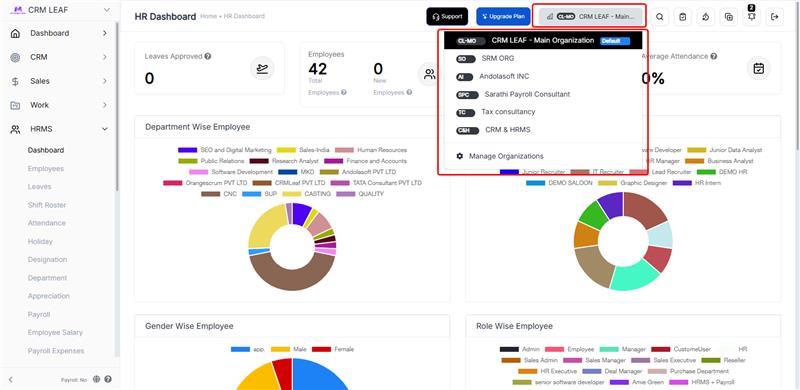
Manage multiple organizations with organization switching, shared employee access, organization-wise time tracking .
Opening Stock Editing Issue Resolved
Fixed an issue that prevented users from editing the Opening Stock field while updating products, ensuring smoother inventory management.
Project Templates with Milestones
Create reusable project templates with predefined milestones, tasks, and workflows to accelerate project setup.
Google Drive and OneDrive Integration
Access, upload, and manage files directly from Google Drive and Microsoft OneDrive within CRMLeaf.
Internal Notes with GPS Tracking and Photo Uploads
Capture internal visit notes with latitude, longitude, location history, and image uploads for complete field activity tracking.
DocuSign Integration
Send contracts and proposals for e-signature directly from CRMLeaf. Track signing status in real time and close deals faster without leaving your CRM.
Monthly Distance Tracking Dashboard
Track total travel distance covered by employees each month for reimbursement, reporting, and productivity analysis.
Email Integration: Every Client Email, Automatically Logged
Connect Gmail and Outlook with CrmLeaf to automatically log every client email to the correct Lead, Contact, Deal, Client, or Ticket. Eliminate manual email tracking, improve team collaboration, and keep every customer conversation organized in one place.
Expense Billing to Clients
Convert reimbursable expenses into billable client charges directly from expense records.
Goods Return Workflow Management
Streamline return requests, approvals, inspections, and inventory adjustments through a dedicated goods return process.
Customer Feedback System
Collect customer feedback, ratings, and service reviews directly within CRMLeaf to improve customer experience.
One User, One Device Login Restriction
Improve account security by limiting each user account to a single authorized device login.
QuickBooks Online Integration
Automatically sync invoices, payments, customers, and line items from CRMLeaf to QuickBooks Online. Eliminate manual bookkeeping, reduce accounting errors, and speed up month-end reconciliation with secure one-way synchronization.
Travel Allowance Auto Calculation & Reimbursement
Automatically calculate travel distance, mileage allowances, and employee reimbursements based on approved travel records.
Construction CRM for Project Management
Manage construction projects, client communication, and site activities from one platform. Track leads, contractors, project tasks, and important documents while keeping every stage of the construction workflow organized.
Basic Ask AI Smart Integration
Use AI-powered assistance to quickly analyze data, generate insights, and get instant answers within the system. This helps teams work faster and make more informed decisions.
Customer Onboarding Process Management System
Create a structured onboarding experience for new customers by organizing tasks, documents, and communication in one workspace. Ensure every client receives a smooth and professional onboarding process.
Calendly Integration for Meeting Scheduling
Automatically schedule meetings and demos by connecting with Calendly. Sync appointments, reduce manual scheduling, and streamline meeting coordination with prospects and clients.
WhatsApp Integration for Customer Communication
Communicate with customers instantly through WhatsApp. Send updates, follow-ups, and support messages while keeping conversations organized within customer records.
Manufacturing CRM for Sales Management
Coordinate customer orders, production activities, and sales processes in one place. Improve collaboration between sales and manufacturing teams while maintaining clear visibility into every order.
End-to-End Solar Lead Management
Capture, track, and manage all solar leads in one centralized system with clear status, source tracking, and follow-up reminders to ensure no opportunity is missed.
Site & Property Master Management
Maintain complete site profiles including roof details, electrical info, approvals, and location data to ensure faster planning and error-free execution.
Survey Documentation with Photos & Videos
Upload and organize site photos, videos, drawings, and notes in one place to create standardized, professional survey records for every installation.
Intelligent Solar Assessment & ROI Calculator
Automatically calculate system size, power generation, savings, and ROI to generate data-backed recommendations and customer-ready assessment reports.
Auto-Generated Professional Estimates
Create branded, accurate solar estimates in minutes using data directly from surveys and assessments with automatic calculations and PDF export.
BOQ & BOM Based Material Planning
Generate project-wise Bill of Quantities and cross-project Bill of Materials to ensure accurate procurement, better inventory planning, and zero site delays.
Project Stage Tracking & Execution Workflow
Track every installation across defined stages with live status, timelines, and team assignments to keep projects on schedule and customers informed.
Milestone-Based Payment Management
Define payment schedules, track due and received payments, send automated reminders, and get a clear view of your cash flow at any time.
Maintenance Scheduling & Service History
Plan recurring maintenance, assign technicians, record service history, and maintain warranty-proof documentation for every installed system.
Business Intelligence & Performance Dashboards
Track sales, project profitability, revenue, conversion rates, and growth trends with management-ready dashboards and exportable reports.
Manufacturing Work Orders & Job Management
Create and manage production jobs with due dates and stage-wise progress tracking. Get complete visibility from raw materials to finished goods and keep production schedules under control.
Bill of Materials (BOM) Based Production Planning
Define product structures with components and quantities and automatically drive material planning. Reduce stock errors, improve accuracy, and avoid last-minute procurement.
Material Requisition & Consumption Tracking
Request, reserve, and record actual material usage directly against jobs. Maintain real-time inventory accuracy and improve cost control across production.
Multi-Stage Production Routing
Track jobs across stages like cutting, assembly, and finishing with live progress updates. Identify bottlenecks early and prevent schedule slippages.
Production Scheduling & Capacity Visibility
See what’s planned, spot resource conflicts, and track delays before they impact delivery commitments.
In-Process Quality Checks
Build inspections directly into production workflows and record results at every stage to reduce rework and returns.
Finished Goods Receipt to Inventory
Close production jobs and automatically update finished goods inventory for real-time stock visibility.
Production Cost & Waste Tracking
Track planned vs actual material usage, monitor waste, and analyze variances to improve margin control and operational efficiency.
Central Asset Register
Manage all machinery and equipment in one place with serial numbers, locations, warranty details, and purchase history.
Preventive Maintenance Scheduling & Work Orders
Schedule recurring maintenance and create repair work orders to reduce breakdowns and improve equipment uptime.
Asset Maintenance History & Cost Tracking
Maintain complete service logs including parts used, vendors, and repair costs to lower total cost of ownership.
Asset Downtime & Availability Tracking
Track out-of-service periods and monitor asset uptime to improve reliability and maintenance planning.
Asset Alerts & Warranty Reminders
Receive automatic notifications for maintenance schedules, calibrations, and warranty expiries so nothing is missed.
Asset Document Attachments
Attach manuals, invoices, certificates, and photos directly to asset records for easy audits and service execution.
2025
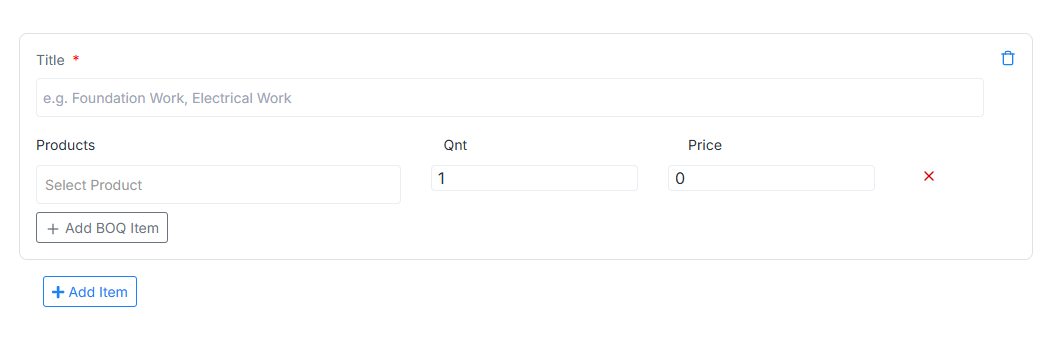
BOQ for Manufacturing Module
Easily add and manage materials, services, labor teams, and pricing for precise production planning. A streamlined BOQ workflow that reduces errors, improves cost control, and boosts operational efficiency.
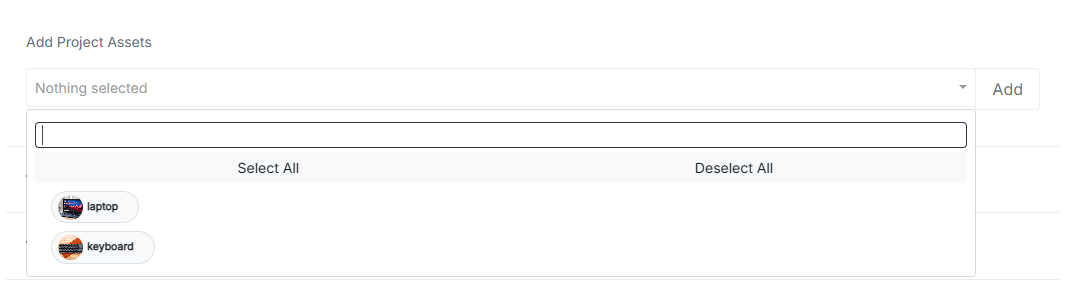
Add & Manage Project Assets
Track machinery, equipment, and project assets with simple add, edit, and delete options. Enhance accountability and ensure optimal asset utilization across every project.
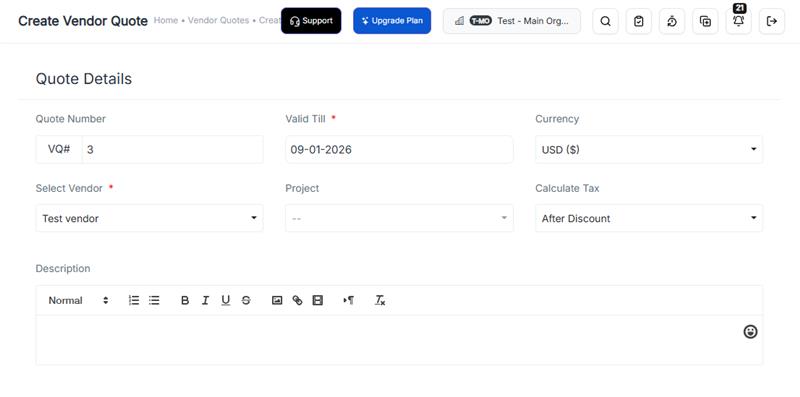
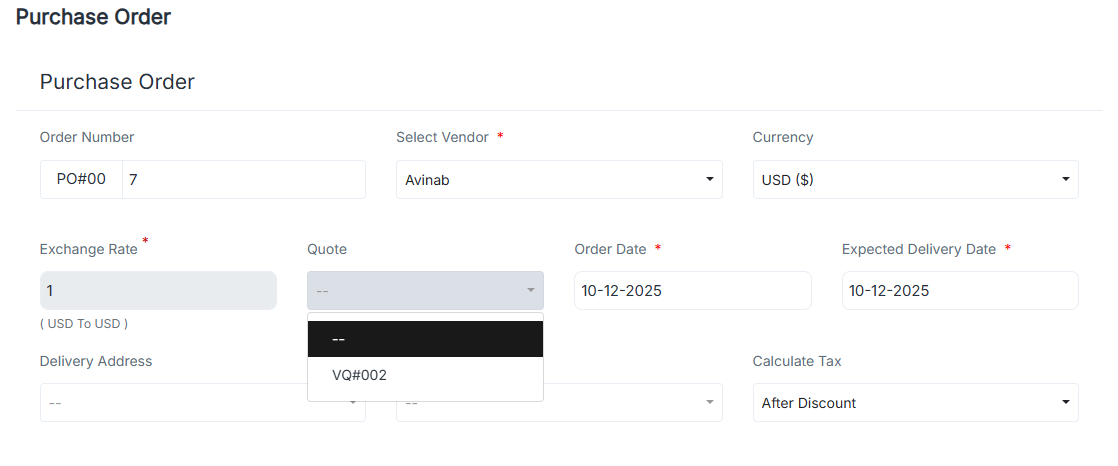
Vendor Quotes for Smarter Purchasing
Create detailed vendor quotes and reuse them to generate multiple purchase orders effortlessly. Speed up procurement, maintain pricing accuracy, and eliminate repetitive data entry.
Turn Vendor Quotes into Purchase Orders
Compare multiple vendor quotes and turn the best one into a purchase order instantly. A seamless, click-efficient flow that accelerates procurement and improves vendor decisions.
Removed Data Deletion Page
We removed the deprecated Data Deletion page and cleaned up related slug routing to avoid broken links and unused navigation elements.
Hero Image Updates
Random hero images were refreshed to improve visual appeal and consistency, ensuring a more engaging browsing experience across key landing pages.
Component Readability Upgrade
The Story Timeline component was refactored to improve readability and structure, making future updates and maintenance more efficient for the development team.
CRM Dashboard Improvements
We rolled out updated CRM dashboard versions with improved filters, clearer stats, and a smoother navigation experience for faster decision-making.
Deals & Pipeline Fixes
Multiple fixes were applied to improve Deals pipeline reliability, data sync behavior, UI alignment, and conflict handling during updates.
Deals New Design
A refreshed Deals UI is now live with improved layout, better visual hierarchy, and easier stage navigation for users managing opportunities.
Free Tool API Update
Free Tool API version 6 has been deployed with improved performance, stability enhancements, and better error-handling for external integrations.
Sidebar Usability Enhancements
Improved sidebar visibility, spacing, and background layering to provide a cleaner experience, especially in help center sections and multipage navigation views.
Improved Content Sorting Logic
Help center and academy pages now sort categories dynamically using CPTCustomDate to ensure the most relevant and latest content appears first.
Search Upgrade in Academy
Academy search functionality was enhanced with new typing support and faster query response to help users find learning resources easily.
Attendance Import
Teams can now import attendance files directly, reducing manual processing and making onboarding more efficient.
Pricing Page Improvements
The pricing table layout was updated with clear headings and spacing adjustments to improve readability and user decision confidence.
UI Refinements and Cleanup Sep 18, 2025
Minor refinements across layout spacing, mobile alignment, and tab navigation were applied to standardize the UI across pages.
Major Navbar Improvements
The Navbar was upgraded with dynamic rendering, improved responsiveness, and better mobile navigation, ensuring smoother browsing across all screen sizes.
New Pricing Tags Added
A new dynamic pricing tag component was introduced to display pricing and plan benefits more clearly based on user interaction.
Mobile App Section Added
We added a dedicated Mobile App section and new homepage components to highlight mobile-first features and user benefits.
Multi-Organisation System
Multi-organisation support is now available, enabling users to manage multiple branches or entities under one login with separated datasets.