Across the last few rounds of customer conversations, one gap came up more than any other: the CRM knows about a Deal, the Client record knows about a Project, but the actual conversation – the emails where pricing gets negotiated, delivery dates get promised, and complaints get raised – lives somewhere else entirely, usually in one person’s inbox.
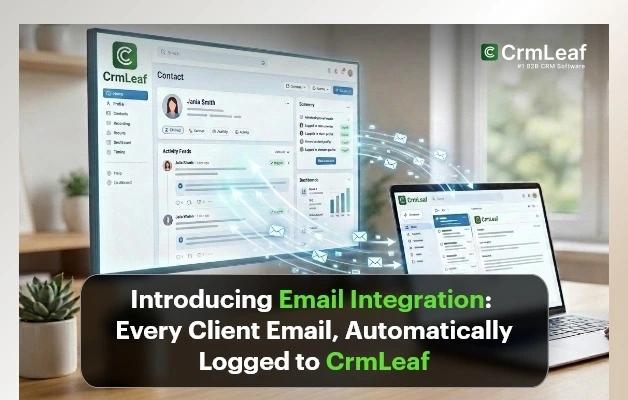
Today we’re closing that gap. Email Integration connects Gmail or Outlook to CrmLeaf and keeps every relevant thread in sync automatically, in both directions.
Why we built this
The pattern showed up in almost every customer flow we mapped, and it wasn’t specific to one industry. A solar EPC firm, a construction company, and an IT services shop all described the identical gap: a rep emails a client, the client replies, and a second rep – or a manager, or someone covering while the first rep is on leave – has no idea any of it happened unless it was manually copy-pasted into a note. The channel changes (email instead of a call), but the outcome is the same everywhere: institutional knowledge that lives in one inbox instead of in the system of record.
of client email threads never make it into a CRM record when logging is manual – based on aggregated pipeline audits across CrmLeaf customer accounts
That untracked 31% isn’t evenly distributed. It clusters around exactly the emails that matter most: the “can you confirm the price includes installation” thread, the “we’re not happy with the delay” complaint, the “please resend the signed proposal” follow-up. These are the threads that decide whether a deal closes or a client churns – and they were the ones most likely to be sitting, unlogged, in a single inbox.
What’s included in this release
- Two-way sync — connect Gmail (Google Workspace) or Outlook (Microsoft 365); reply from CrmLeaf and it sends from your real address
- Automatic thread matching — any email involving a known Lead, Contact or Client address is logged to the right record with no forwarding or BCC step
- Inbound-to-Ticket — email sent to a designated support address becomes a Ticket automatically, pre-linked to the Client if one exists
- Assignment rules — round robin, owner-based, or a shared manual queue for new inbound threads and tickets
- Team-wide visibility — every synced thread sits on the shared Deal, Client or Ticket timeline, not in a single person’s inbox
How it works
Setup takes under ten minutes and doesn’t require IT involvement:
- Go to Settings → Integrations → Email and choose Gmail or Outlook
- Authorize access through Google or Microsoft’s own OAuth screen – CrmLeaf never sees or stores your password
- Set which record types (Leads, Contacts, Clients) email addresses are matched against
- Optionally designate a support address for automatic Ticket creation
- Choose an assignment rule for new tickets and unmatched threads
The full walkthrough, including screenshots for both Gmail and Outlook, is in the setup tutorial.
Built for every industry we serve
Email Integration isn’t a solar-specific feature bolted onto the CRM – it works identically across every CrmLeaf product, because the underlying problem is the same everywhere: the conversation that actually decides a deal, a change order, or a service renewal happens over email, outside whatever system is supposed to be the record of truth. Here’s what the same integration looks like in a few of the industries we serve.
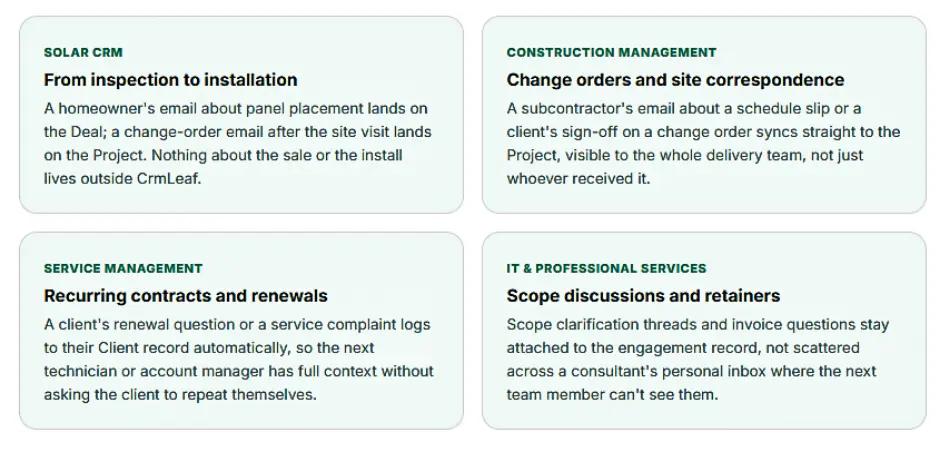
The mechanics don’t change from one industry to the next – matching rules, two-way sync, and inbound-to-Ticket conversion all work the same way regardless of what CrmLeaf product sits on top of them. What changes is only the record the thread attaches to: a Deal and Project for a solar installer, a Project and change order for a construction firm, a Client contract for a service business.
Our account managers used to keep client renewal history in their own inboxes. If someone left, that history basically left with them. Now it’s just part of the client record, the same as everything else.
Beta customer, Operations Lead – regional service management provider
We used to lose a full day every month just piecing together what was promised to a client by email. Now it’s just… on the deal. Nobody has to ask.
Beta customer, Sales Manager – 40-person solar EPC firm
What this doesn’t do
⚠ By design: Email Integration only syncs threads where the sender or recipient matches an existing CrmLeaf record. Your full inbox is never scanned, indexed, or stored – personal and unrelated correspondence stays exactly where it is.
This was a deliberate design constraint, not a limitation we plan to lift. A CRM that reads everything in your inbox is a bigger privacy surface than most teams are comfortable granting, and it wasn’t necessary to solve the actual problem – which was never “read all my email” it was “don’t lose the email that matters to the business.”
💡Key takeaway: Turn on matching against Leads, Contacts, and Clients from day one – narrowing it later means retroactively syncing history is not possible for the period the rule was off.
What’s next
Email Integration ships alongside the workflow most CrmLeaf customers described in early conversations: lead in, deal nurtured, inspection or proposal sent, deal won, project delivered, invoice raised. That’s the solar version of the sequence – the construction and service management versions look slightly different but hit the same shape. Email was the one channel in that flow that still lived outside the system, in every one of those businesses. It doesn’t anymore.