In short: what this article covers
B2B SaaS teams collect more product-usage data than ever, yet salespeople still see a prospect as just “active user.” AI closes that gap by reading behavior as a story, so Sales learns what a prospect is trying to do, how serious they are, and what to say next.
What is AI buying intent? AI buying intent is an AI-generated reading of what a prospect’s product behavior says about what they want to buy, how serious they are, and what Sales should do next. It differs from a lead score, which only counts activity.
- The problem: product analytics shows what users do, but not what those actions mean for a purchase.
- The hidden signal: buying intent lives in combinations of actions, such as Quotes + Projects + Time Tracking + Billing together, not in any single click.
- The fix: an AI buying-intent layer that turns product activity into a plain-language sales signal, tied to the right account and the right next step.
- The flow: your analytics tool (PostHog, Mixpanel, Amplitude, Heap, GA4, Hotjar or Clarity) captures behavior, MCP gives AI access to it, AI interprets intent, CRMLeaf MCP creates the client and deal, and email automation sends a relevant follow-up.
- The outcome: Sales starts conversations with context instead of discovery questions. Activity becomes intent, intent becomes opportunity, and opportunity becomes action.
This article walks through a salesperson’s normal working day, ten pain points that make it harder than it should be, and how AI-assisted sales changes each one.
A Tuesday in the life of a SaaS salesperson (today)
Meet Priya, an account executive at a B2B SaaS company. She sells a project and billing platform to service businesses. Her Tuesday looks familiar to almost every sales team.
9:00 AM, the trial list. Priya opens her CRM and sees 40 accounts on free trial. Each row shows a name, a signup date and a status: “Active.” Nothing tells her which accounts deserve her next hour.
10:00 AM, the guessing game. She picks five names at random or by company size. For each one she opens the product admin panel, then the analytics tool, then scrolls through a raw event list: “project_created,” “user_invited,” “page_viewed.” Twenty minutes per account disappear into reading logs.
11:30 AM, the generic email. She sends the same message to all five: “Hi, how is your trial going? Happy to help if you have questions.” Two never reply. One replies “all good, thanks.”
2:00 PM, the discovery call. A prospect finally picks up. Priya spends the first 20 minutes on questions the product could have already answered: What are you trying to solve? Which team will use it? How do you handle billing today? Which tools are you comparing?
4:00 PM, the late discovery. On a call, she learns the prospect has already built three projects, invited seven colleagues and checked pricing twice. They were halfway through an evaluation, and nobody on her team knew.
5:30 PM, the CRM update. She types notes into the CRM from memory. The record now says what she remembers from the call, not what the customer actually did in the product.
Nothing here is a performance problem. Priya works hard. It is an information problem. The most honest record of buyer interest, the way people actually use the product, sits in one system while the person who needs it works in another.
The real problem: data-rich, meaning-poor
The deeper problem is that a product generates a huge amount of behavioral data, but very little of it is converted into sales intent.
Picture a prospect who spends 45 minutes in your product. They configure 8 settings, visit 12 screens, create 3 records and abandon 2 workflows. The salesperson may still see only “Active user.” Every one of those actions was a clue. None of them reached the person who could act on it.
We can state the gap in one sentence: the SaaS knows what the customer is doing, but Sales doesn’t know what those actions mean.
Most companies already have the first half of the chain:
Product → Behavioral data
What they are missing is everything after it:
Product → Behavioral data → Intent interpretation → Sales action
The rest of this article is about that missing middle.
Ten pain points that hide buying intent
Priya’s Tuesday is the visible symptom. These ten pain points are the causes, and each one shows up somewhere in her day.
- Feature usage is not buying intent. A prospect uses Quotes, Projects, Timesheets and Billing, but Sales can’t tell which one is driving the evaluation. Priya opens the demo with the wrong module.
- There is too much behavioral data. Product analytics can record hundreds of events per account. No salesperson can read that by hand, so most of it goes unread.
- Actions come with no context. “Created 5 projects” tells you what happened, not why. Were they testing, migrating real work or following a tutorial?
- Feature combinations are hard to interpret. Quotes plus Projects plus Timesheets plus Billing together can signal a professional services automation (PSA) need. Seen one at a time, each looks like ordinary activity.
- Sales discovers intent too late. Priya learns what the prospect wants when she asks, “So, what are you looking for?” By then, the customer has already evaluated the product at length.
- Every prospect gets the same follow-up. Without behavioral insight, the email is “How was your trial?” for everyone, whether they explored for ten minutes or built a full workflow.
- Product-qualified leads are poorly identified. Someone who performs 20 meaningful actions is often more valuable than someone who logs in 15 times and does nothing. Both look equally “active.”
- There is no buying-stage visibility. Sales can’t tell whether the user is exploring, comparing, validating, configuring or preparing to purchase, so outreach timing is a guess.
- Multiple users create fragmented signals. The admin explores Billing, a manager explores Projects, and finance explores Invoices. Nobody connects these into one account-level buying story.
- Sales has to interrogate the customer. Instead of the product telling Sales what matters, the salesperson works through dozens of discovery questions, which costs time and patience on both sides.
Notice the pattern. None of these are data-collection problems. They are interpretation problems: the facts exist, but the meaning does not.
The biggest one: intent hides in combinations
A single product event rarely proves anything. A pattern of events across several days often does. Here is an illustrative three-day trial on CRMLeaf.
Day 1. The prospect creates a company, adds 3 contacts and creates a quotation.
Day 2. They create a project, add tasks, assign users and start time tracking.
Day 3. They create an invoice, look at project profitability, visit reports and check pricing.
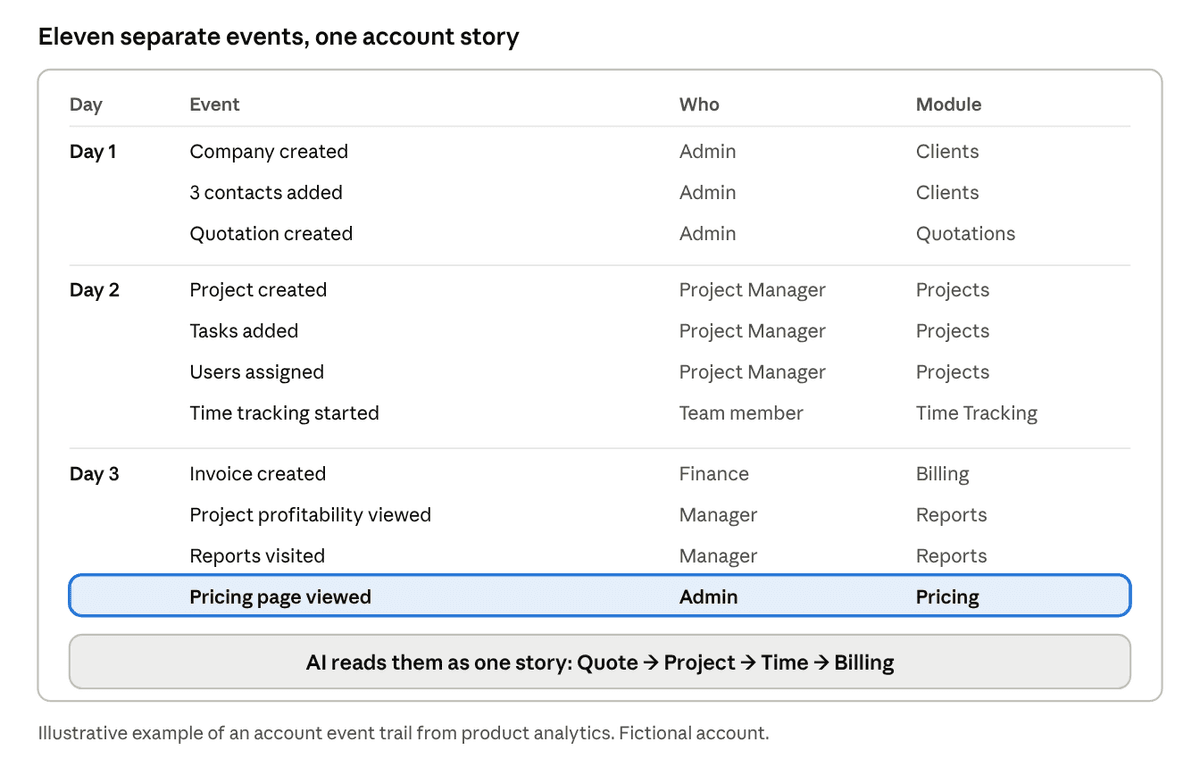
Illustrative account event trail · 11 events over 3 days
This is what product analytics shows: a long list of events. The meaning is not in any row, it is in the pattern across the rows.
Taken individually, each of those is a routine event. Taken together, they tell a very different story: this company is evaluating CRMLeaf as an end-to-end professional services platform, particularly around the Quote → Project → Time → Billing workflow.
That is the intelligence a salesperson actually needs. The demo should not walk through features alphabetically. It should follow the prospect’s own path from quotation to invoice and show how profitability is tracked along the way.
A slightly longer chain makes the point clearer:
4 quotations created
→ 2 projects created
→ 8 team members added
→ time tracking started
→ billing viewed 6 times
→ AI reads: “Evaluating a quote-to-cash workflow”
→ Sales receives: “High-intent opportunity”
→ Suggested action: demo quotation → project → timesheet → invoice
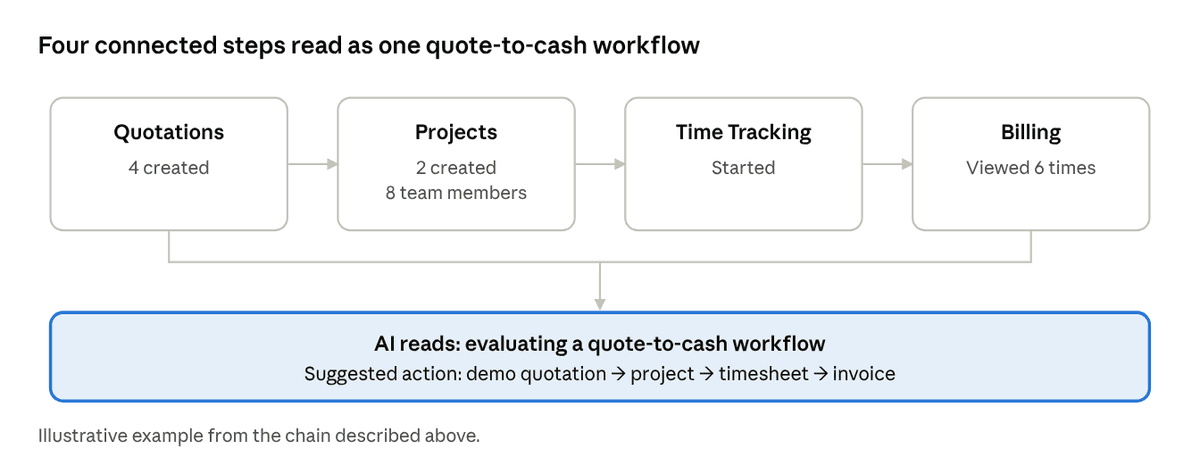
Illustrative workflow journey · 4 steps read as one signal
Any single step looks ordinary. The four together form a recognizable business process, which is the signal Sales needs.
Compare that with a conventional lead score. “Lead score: 78” is a number. It leaves Priya with every question still open: why are they interested, what problem are they solving, what should I demonstrate, what might they object to, and are they comparing us with someone else? A score says how much. It does not say what, why or what next.
From user behavior to account behavior
In B2B SaaS, the person using the product is rarely the only person involved in the purchase. One account might look like this:
- Employee A explores Projects.
- Employee B tests Timesheets.
- Employee C checks Billing.
- A manager opens Reports.
- An admin looks at User Management.
If you analyze each user alone, you see five modestly active people. If you analyze the account, you see a team testing a complete delivery-to-billing workflow, with an admin preparing for rollout. That is a very different picture.
So the system has to aggregate. It moves from user behavior to account behavior, and eventually to a statement Sales can use: “This account appears to be evaluating CRMLeaf for 25 users across project delivery, time tracking and billing.”
This is also where day-to-day sales work gets easier. Priya no longer reconstructs the story from five separate user profiles. The account already arrives as one story, with the right contact, the likely requirement and the roles involved.
Timing: knowing when to engage
Sales doesn’t only need to know what the customer wants. It needs to know when to reach out. Compare two signals.
On Monday: “Customer viewed Pricing.”
On Thursday: “Customer created 3 projects, invited 7 users, configured billing, viewed pricing twice and returned to the invoice module.”
The second signal is far stronger, and it calls for a different kind of outreach. A buying-intent layer should place each account in one of five stages:
| Stage | What it looks like in the product | What Sales should do |
|---|---|---|
| Exploration | Browsing screens, light clicking, no real records | Stay quiet; send helpful educational content |
| Evaluation | Testing specific workflows end to end | Offer a short, focused demo of that workflow |
| Validation | Recreating their real business process with realistic data | Bring a specialist; discuss setup and migration |
| Commercial intent | Checking pricing, user limits, billing and integrations | Share a clear proposal and answer pricing questions |
| Purchase readiness | Inviting stakeholders, configuring production-like data, returning to pricing | Reach out personally and help close |
The stage matters as much as the topic. A heavy-handed call during Exploration scares people away. Silence during Purchase readiness loses the deal to whoever calls first.
From lead scoring to an AI buying-intent engine
A lead score counts activity. An AI buying-intent engine interprets it. The difference is the whole idea.
Traditional: 100 events → Lead score 72
Intent engine: 100 events → AI interprets behavior
Primary intent: Project-to-billing automation
Secondary intent: Replace multiple tools
Buying stage: Evaluation
Confidence: High
Key users: Admin + Project Manager
Likely pain: Fragmented project, time and billing workflow
Recommended action: PSA workflow demo
Outreach style: Personalized
Next best question: “How are you currently connecting project
delivery with invoicing?”
The second output is something a salesperson can use before picking up the phone. It answers the questions a score leaves open:
- Why is the prospect interested? Because their workflow spans several tools today.
- What should I demonstrate? The quote-to-invoice path, with profitability.
- What should I ask? The next best question, written out.
- When should I act? The stage and confidence tell me.
This also fixes pain point 7. A prospect with 20 meaningful actions is no longer flattened into the same “active” bucket as someone who simply logged in 15 times. The engine weighs what was done, in what order, by whom.
The automation: analytics → MCP → AI → CRMLeaf MCP → email
The idea becomes practical when you connect the systems you already use. CRMLeaf ships an MCP server for AI assistants, which is how you connect an AI assistant such as Claude to your CRM without custom integration code. Each layer has one job.
- Your analytics tool captures behavior. It records what each user does in the product: records created, workflows started, screens visited, invites sent, pricing views. Tools such as PostHog, Mixpanel, Amplitude, Heap or Google Analytics 4 do this, and whichever you use is the source of truth for what happened.
- MCP makes that context available to AI. The Model Context Protocol (MCP) is an open standard that lets AI assistants read from and act on external tools in a structured, permissioned way. It is the bridge between the analytics data and the model.
- AI interprets the activity. It reads the combined behavior, groups users into an account, and identifies the likely requirement, the buying stage and the strength of the signal.
- CRMLeaf MCP turns insight into a CRM action. Through CRMLeaf’s MCP connection, the AI creates the client, creates or updates the deal, and writes the intent insight straight into the deal record, so it is waiting for Sales on the Deal detail page (more on that below).
- Email and sales automation triggers a relevant follow-up. A message is drafted or sent based on what the customer is actually evaluating.
Which analytics tool can you use?
The pattern in this article works with any product analytics platform that records events per user and per account. PostHog, Mixpanel, Amplitude, Heap and Google Analytics 4 are common choices, and each can feed the same flow. Behavior-insight tools such as Hotjar and Microsoft Clarity add a different layer: session recordings, heatmaps, scroll depth and rage clicks show how a user moved through a screen, for example hesitating on the pricing page or abandoning a billing form. Together, event analytics says what happened and behavior tools hint at how the person felt about it. What matters is that events carry an account identifier, so activity can roll up from users to accounts, and that the AI can reach the data through an MCP server or an API connection.
Which tool sends the follow-up email?
The last step is flexible. Pick whichever channel your team already uses:
- Gmail through MCP. The AI creates a personalized draft in the salesperson’s Gmail, or sends it, using the insight from the deal. Starting with drafts keeps a human review step in place.
- Brevo through MCP. The AI hands the contact and the context to Brevo, so a relevant email or short sequence goes out from your marketing platform.
- Drip through MCP. The AI passes the contact and the intent tags to Drip, so the right automated email workflow starts for that stage and workflow interest.
- Flodesk through MCP. The AI adds the contact to a segment such as “Evaluating quote-to-billing,” and the matching Flodesk email or workflow takes over.
- CRMLeaf’s own email integration. Built into the platform, so no extra tool is needed. The salesperson sends the follow-up from the Deal, using a template, and replies sync back to the same conversation. The next section explains why this is the tightest loop.
Why CRMLeaf’s own email integration closes the loop
If you want the fewest moving parts, use CRMLeaf’s built-in two-way CRM email. It is the one option where the insight, the email and the reply all live on the same deal.
Here is how it works. An administrator enables the CRM email add-on and connects a Gmail or Outlook mailbox (Outlook through Microsoft Graph) by signing in with OAuth, so no mailbox password is stored in CRMLeaf. From then on, a salesperson can send email to a lead or client directly from the deal, using a saved template if one fits. Replies are synchronized back and attached to the deal’s conversation, and open tracking shows whether a message was read.
Why that matters for the intent workflow:
- The briefing and the email sit side by side. The AI writes the buying signal into the Deal notes, and the rep sends the follow-up from the same screen without switching tools.
- The outcome stays on the deal. Opens and replies attach to the same conversation, so the next step is based on what happened after the last email. Those opens and replies are also a fresh intent signal in themselves.
- Handover is painless. Because the conversation lives on the deal rather than in one rep’s inbox, anyone with access to the deal can read the full history.
- Templates keep the message consistent. A team can save one template per workflow, for example a quote-to-billing walkthrough, and let the detected intent decide which one to send.
- Your normal mailbox stays. CRMLeaf sends through Gmail or Outlook; it does not replace them.
One practical note: CRM email is an add-on module, so confirm it is included in your plan and enabled by an administrator. It is separate from CRMLeaf’s SMTP setting, which sends system email such as invoice notifications, and from Email Ticketing, which turns a support mailbox into tickets.
How the insight lands on the Deal detail page
This is the step that makes the whole flow useful day to day. Through the CRMLeaf MCP server, the AI does not just create records; it writes the interpretation into them. It can create the lead and the deal, set the pipeline, stage, value and expected close date, and add a short briefing to the Deal notes. Later, as new behavior arrives, it updates the same deal instead of creating a duplicate, and it can move the deal to a later stage when the signals justify it.
When the salesperson opens the Deal detail page, the briefing is already there:
Buying signal (updated Oct 8)
Primary intent: Quote-to-billing workflow (PSA)
Buying stage: Validation | Confidence: High
Evidence: 4 projects created, 11 users invited, 32 hours
logged, 6 invoices viewed, pricing visited 3 times
Key users: Admin + Project Manager
Likely pain: Project delivery and invoicing in separate tools
Next action: PSA workflow demo with the Operations Manager
Next question: “How do you connect project delivery with invoicing today?”
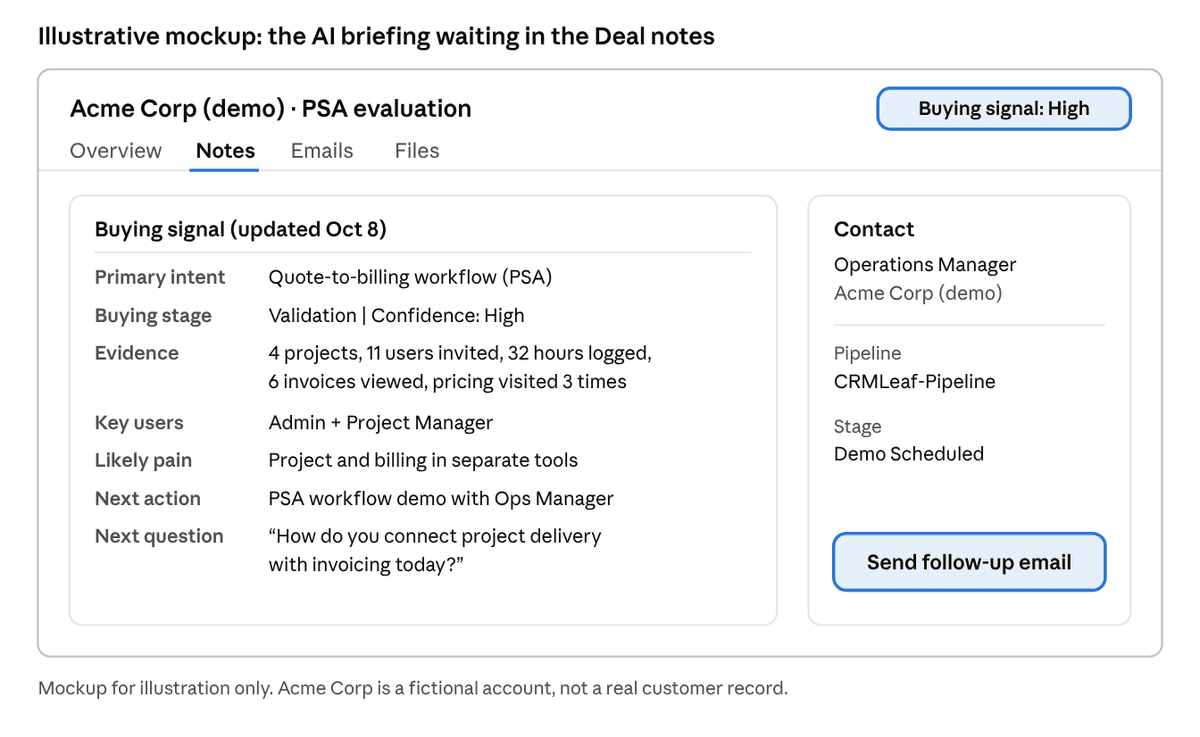
Illustrative mockup · Deal detail page with the AI briefing in Deal notes
In this mockup, the Notes tab carries the briefing, the contact sits alongside it, and the follow-up email is one click away.
That turns the deal from a name and an amount into a briefing. Priya can read it in thirty seconds, send the follow-up from the same screen, and add her own notes after the call.
The contrast in that last step is the point. Instead of “Hi, just checking if you’re interested,” the prospect receives something closer to: “Teams that connect quotes, projects and billing often struggle with profitability tracking. Here is a short walkthrough of how that works.” It speaks to the problem they are already working on.
Here is the same illustration Priya might receive in her inbox or CRM on a Thursday morning:
Buying signal detected: Acme Corp (illustrative example). The account has heavily explored Project Management, Time Tracking and Billing over the last 72 hours. Evidence: 4 projects created, 11 users invited, 32 hours logged, 6 invoices viewed, pricing visited 3 times. Hypothesis: they want to consolidate project and billing workflow into one platform. Recommended action: contact the Operations Manager with a PSA workflow demo. Suggested opening: “Many teams we talk to are trying to connect project delivery and invoicing without re-entering data. How are you handling that today?”
The goal is not to collect more customer data. The goal is to turn customer behavior into sales intelligence.
The same Tuesday, with intent signals
Now replay Priya’s day with the intent layer in place.
9:00 AM, a ranked list, not a flat one. Her CRM shows 40 trial accounts, but five carry a plain-language signal: “Evaluating quote-to-billing, stage: Validation.” Another eight are tagged “Exploring, no outreach yet.” She knows where to spend her morning in two minutes, not an hour.
10:00 AM, no log reading. Each flagged account already has a summary: who is active, what they built, which workflow they seem to be testing and how confident the AI is. The twenty minutes per account goes back to Priya.
11:30 AM, five different emails. One prospect gets a walkthrough of profitability reporting. Another gets a note about user roles and permissions because their admin has been configuring access. The explorers get a helpful guide and no sales pressure.
2:00 PM, a short discovery call. Priya skips the basic questions and opens with the next best one: “How do you currently connect project delivery with invoicing?” The prospect feels understood, and the call moves to the real requirements in five minutes.
4:00 PM, no surprises. She already knew about the seven invited colleagues and the pricing visits. She arrives with the right demo and, if needed, the right specialist.
5:30 PM, the CRM updates itself. The deal, the opportunity context and the behavioral evidence are already recorded through the CRMLeaf connection. Priya adds her judgment from the call, not a reconstruction from memory.
Nothing about her job has been replaced. The part that got easier is the part she never liked: hunting for context.
How AI helps the sales process
AI in sales is often discussed as “writing emails faster.” That is the smallest part of its value. The larger benefit is that AI is good at the exact work this problem needs: reading large volumes of messy data and turning it into a short, useful explanation.
Here is where AI helps across the day-to-day sales workflow:
- Reading behavior at scale. AI can review hundreds of events per account and summarize them in a paragraph, something no salesperson has time to do for 40 accounts.
- Connecting scattered signals. It links actions across users and days into one account-level story, solving the fragmentation problem.
- Interpreting combinations. It recognizes that several modules used together suggest a workflow need, not random exploration.
- Prioritizing attention. It ranks accounts by stage and strength, so Sales works the right accounts first.
- Preparing the conversation. It proposes the demo, the opening line and the next best question.
- Keeping records current. Through MCP, it can write the client, deal and context into the CRM, so data entry stops depending on memory.
- Personalizing follow-up. It drafts outreach that reflects what the customer is working on.
What humans still own matters just as much. AI forms a hypothesis from behavior; it does not know the prospect’s budget, politics or timeline. The salesperson validates the hypothesis in conversation, builds trust, handles objections and closes. The best way to think about it is a research assistant who has read everything before the meeting and hands over a clear briefing. The relationship, the judgment and the decision stay with the person.
Use the signal, don’t expose the surveillance
There is a line to respect. Telling a prospect “we watched you click through our invoice screen six times” can feel invasive, even if the data came from their own trial. The insight should shape the conversation, not announce itself.
A safer approach follows three habits:
- Personalize through relevance, not recitation. Say “many teams we speak to want to connect project delivery with invoicing” rather than listing their clicks.
- Be transparent in your privacy policy. Explain that product usage helps improve the experience and tailor communication, and honor opt-outs and regional privacy rules such as GDPR.
- Collect only what you need. Track meaningful workflow events, not every keystroke, and keep personal data to the minimum the use case requires.
Done well, this feels like a good salesperson who listened carefully, not a tracker who followed the prospect around.
How to start: five practical steps
You don’t need a large program to begin. A small pilot on one workflow is enough.
- Pick the workflow that matters most. For a PSA product, that might be Quote → Project → Time → Billing. Define the five or six events that mark real progress along it.
- Instrument those events in your analytics. Make sure each event carries the account, the user and the timestamp, so activity can roll up from users to accounts.
- Define your intent patterns and stages. Write down what Exploration, Evaluation, Validation, Commercial intent and Purchase readiness look like for your product, in plain language.
- Connect analytics, AI and CRM through MCP. Give the AI read access to behavior and write access to client and deal records, with clear permissions and a human review step at first.
- Start with one follow-up and measure it. Compare reply rates, demo-to-trial conversion and sales-cycle length for contextual outreach against your generic email, then expand what works.
Most teams find that the first win is not automation. It is the first time Sales opens a record and sees a clear summary instead of a blank “Active” label.
The takeaway
Product analytics tells you what customers do. AI tells you what it means. A CRM tells Sales what to do about it. Connect the three, and a chaotic trail of product activity becomes a clear sales signal: from activity, to intent, to opportunity, to action.
The SaaS already knows what the customer is doing. The next step is making sure Sales finally knows what it means.