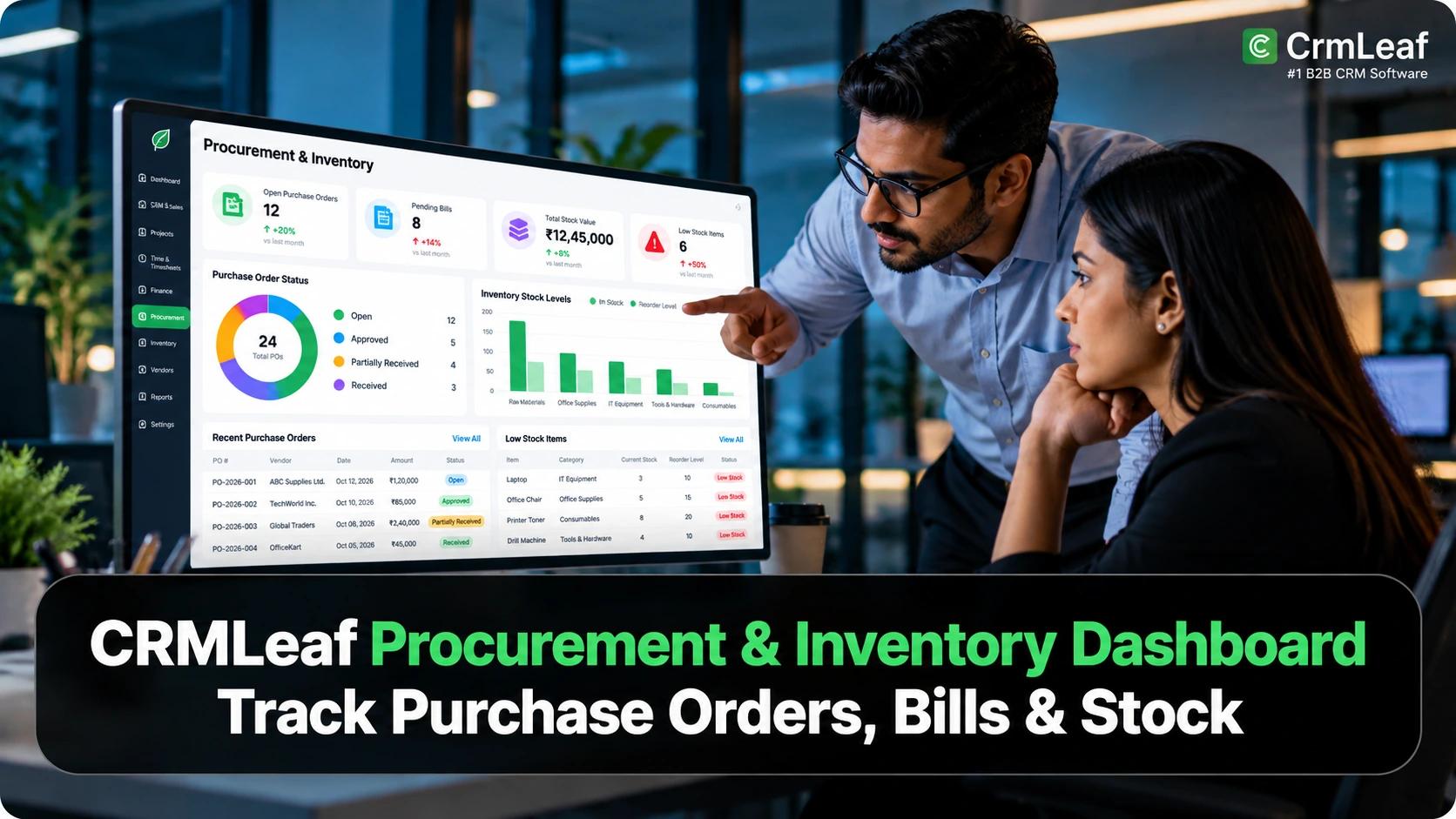
TL;DR: CrmLeaf Procurement & Inventory Dashboard
- Monitor purchase orders: Track purchase, delivery, and billing statuses to identify orders that need follow-up.
- Improve inventory visibility: Review stock availability across warehouses, including low-stock, overstock, and reserved quantities.
- Connect deliveries to bills: Create vendor bills from eligible delivered purchase orders while maintaining linked transaction records.
- Track vendor payments: See which bills remain open, which have partial payments, and which have reached a zero balance.
- Connect purchasing and finance: Follow the procurement workflow from vendor and purchase order to delivery, bill, and payment.
- Review procurement activity: Use the CrmLeaf Command Centre Procurement & Inventory Dashboard to review purchasing, bills, and stock information, subject to account configuration and permissions.
The team has sent a purchase order to a vendor. The warehouse team is waiting for the delivery. Meanwhile, the finance team needs to know whether the goods have arrived, whether anyone has recorded the vendor’s bill, and how much the business still owes.
When teams track these activities separately, answering a simple question—”What is the current status of this purchase?”—can require several conversations, spreadsheet checks and manual record searches.
For businesses managing multiple vendors, purchase orders, warehouses and bills, this creates an operational challenge. Purchasing needs to know what the business has ordered, inventory needs visibility into stock, and finance needs accurate information about bills and payments.
The CrmLeaf Procurement & Inventory Dashboard within the Command Centre provides a reporting view of procurement activities, including purchasing, bills and stock.
CrmLeaf’s underlying Inventory & Procurement functionality connects vendors, purchase orders, deliveries, bills and payments through linked records.
This article explores how procurement dashboard visibility can help teams understand purchasing activity, identify operational exceptions and make more informed decisions using connected business information.
Why Do Businesses Need a Procurement Dashboard?
Procurement is not limited to creating purchase orders.
It involves coordinating vendors, receiving goods, maintaining inventory records, processing bills and tracking payments. When these activities are difficult to monitor, several problems can arise.
- Unclear purchase order status: Teams may struggle to distinguish issued orders from those awaiting delivery or billing.
- Limited inventory visibility: Without reliable stock records, purchasing teams may not know which products are available, running low or accumulating in excess.
- Delayed billing: Finance teams need to know when goods arrive and a purchase order is ready for billing.
- Vendor payment uncertainty: Teams need to understand whether a bill remains open, has a partial payment, or has reached a zero balance.
- Manual status checks: Purchasing, warehouse and finance teams may spend time checking separate records instead of reviewing a consistent transaction history.
A procurement dashboard helps address the reporting side of these challenges by presenting relevant purchasing and inventory information in a more accessible view.
Its value depends on the accuracy of the underlying records and the availability of the relevant product modules.
What Is the CrmLeaf Procurement & Inventory Dashboard?
A procurement dashboard is a reporting interface that helps businesses monitor purchasing activities and related operational information, such as purchase orders, deliveries, bills and inventory status.
CrmLeaf Procurement & Inventory Dashboard provides role-based analytics dashboards, including Procurement & Inventory.
The dashboard’s subject area covers purchasing, bills and stock. Available dashboards depend on company configuration, permissions and the relevant modules enabled for the account.
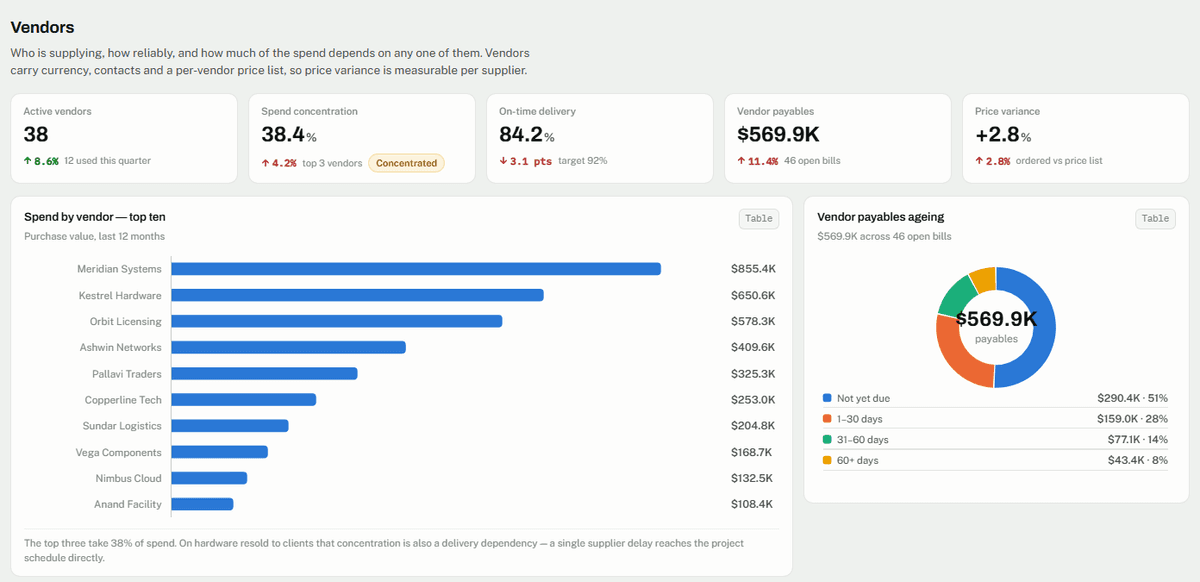
The underlying CrmLeaf Inventory & Procurement module supports operational workflows such as vendor management, purchase order creation, delivery tracking, inventory management, bill creation and vendor payments.
These two capabilities serve related but different purposes:
- The dashboard helps users review information and understand operational status.
- The underlying module manages the records and transactions that feed the reporting process.
This distinction matters because viewing a metric and completing the transaction behind that metric are different activities.
Key Procurement & Inventory Capabilities in CrmLeaf
1. Monitor Purchase Orders and Their Status
Purchase orders provide a formal record of what a business intends to purchase from a vendor.
CrmLeaf supports purchase orders with vendor details, line items, quantities, rates, applicable taxes, discounts and a delivery warehouse.
One important distinction is that a purchase order tracks three independent status dimensions:
- Purchase status: The commercial state of the order.
- Delivery status: Whether the goods have arrived.
- Billing status: Whether the team has created a bill against the order.
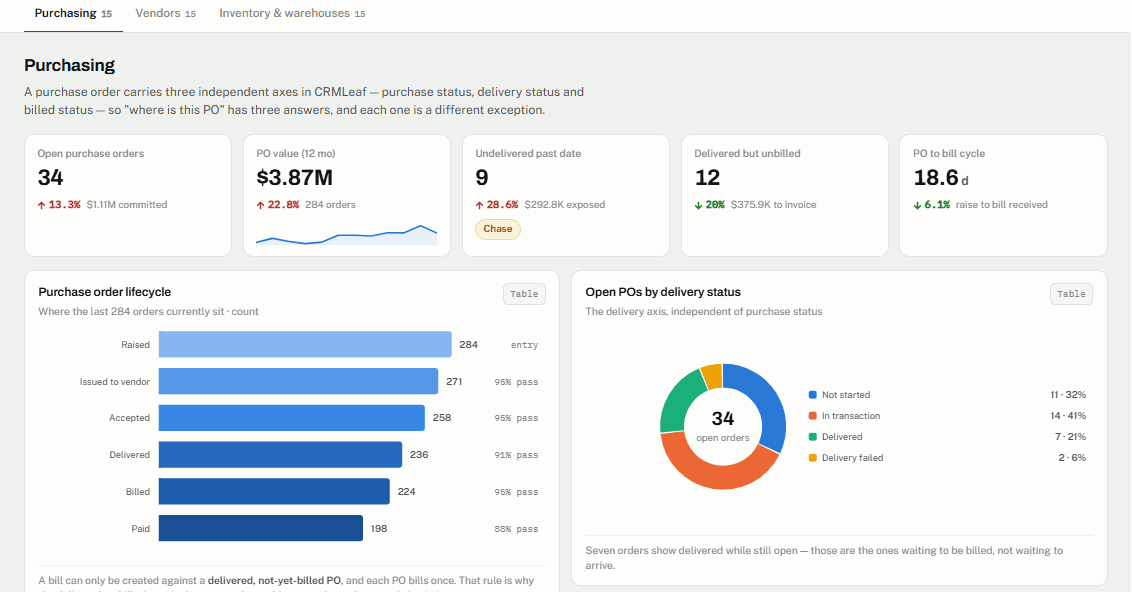
These statuses answer different questions. A team can issue an order to a vendor while delivery is still in progress and billing has not yet occurred.
This separation gives teams a clearer way to investigate outstanding orders and understand which stage requires attention.
For example, an issued order that has not arrived requires a different action from an order that has arrived but still awaits billing.
Read the CrmLeaf purchase order guide for details about creating and tracking purchase orders.
2. Improve Inventory Visibility Across Warehouses
Inventory visibility is essential for businesses that purchase and store products across multiple locations.
CrmLeaf’s Inventory & Procurement functionality supports multi-warehouse inventory records, including quantities, reserved stock, stock-outs and available quantities for each product and warehouse.
It also includes low-stock and overstock indicators, stock transfers between warehouses, and inventory adjustments with reasons and an audit history.
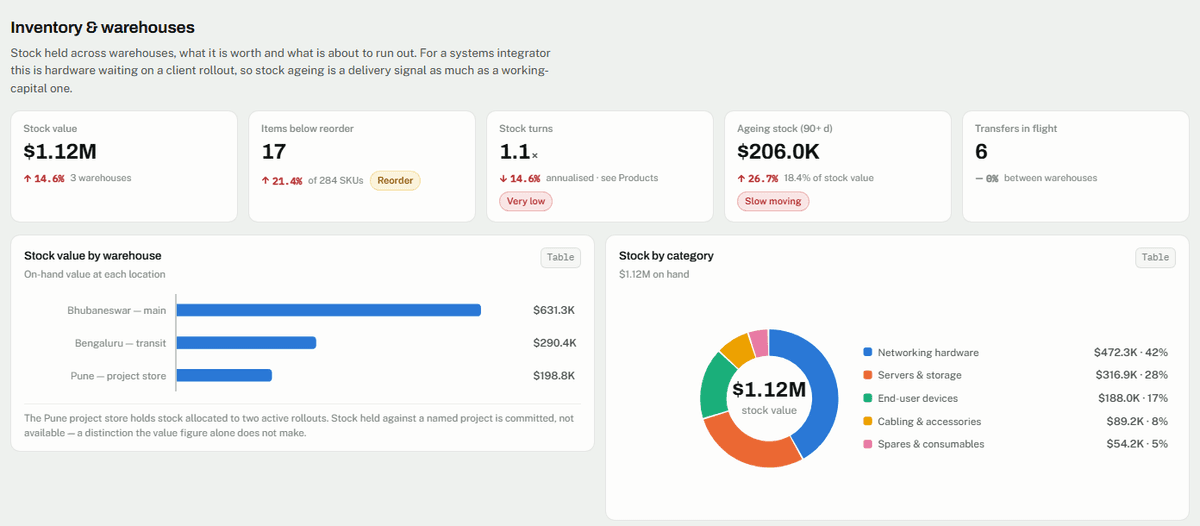
These capabilities help teams investigate questions such as:
- Which warehouse has available stock?
- Which products may require replenishment?
- Where is stock reserved?
- Did someone record an inventory adjustment?
- Could another warehouse transfer stock?
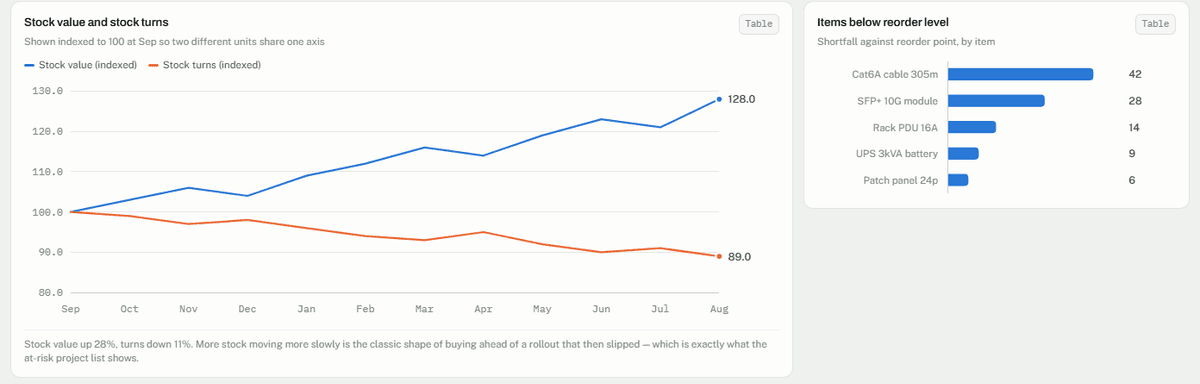
Consider a business that stores equipment in two warehouses. A purchasing decision based only on one location’s stock could result in an unnecessary order.
Reviewing inventory across locations can help the team make a more informed decision.
The benefit depends on keeping receipts, transfers and adjustments accurately recorded. A dashboard cannot compensate for missing or incorrect inventory data.
3. Connect Deliveries to Vendor Bills
Receiving goods and recording vendor bills work together, but they are not interchangeable. CrmLeaf’s documented workflow allows users to create a bill from a delivered purchase order that is still unbilled.
The bill inherits the purchase order’s line items, reducing the need to re-enter the ordered information. Once you create the bill, CrmLeaf marks the purchase order as billed.
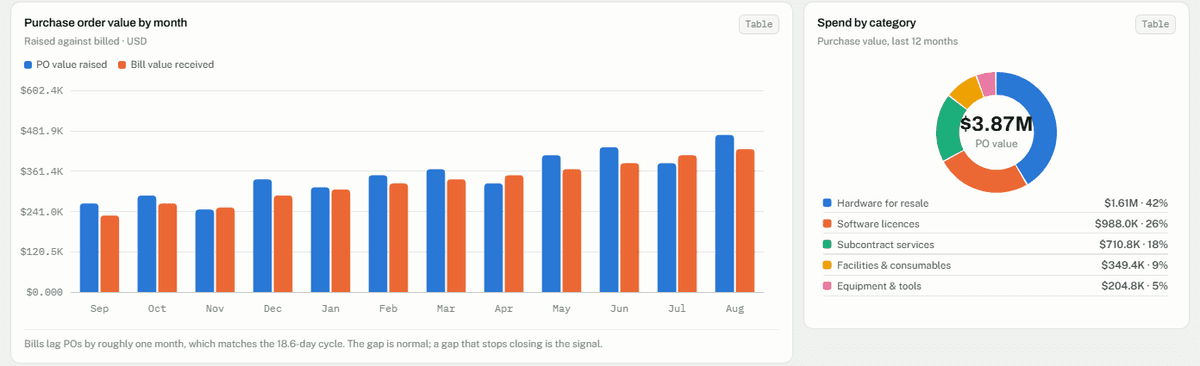
This workflow helps teams maintain a traceable connection between the original order, the delivery and the vendor’s invoice.
Imagine that a vendor delivers equipment, but the finance team cannot find the relevant delivery record. The bill may not be available for creation until someone updates the delivery status correctly.
By recording the delivery before creating the bill, the team maintains a more consistent procurement process. The documented workflow also stops users from billing the same purchase order repeatedly.
For more details, see How to Create a Bill from a Delivered Purchase Order.
4. Track Vendor Bills and Payments
Recording a vendor bill is only one part of the procure-to-pay process. Finance teams also need to track payments and outstanding balances. CrmLeaf supports bill statuses that show whether a bill remains open, has a partial payment, or has a zero balance.
Users can allocate vendor payments to bills. The documented workflow updates the bill’s payment status and creates a vendor credit automatically when a payment exceeds the amount due.
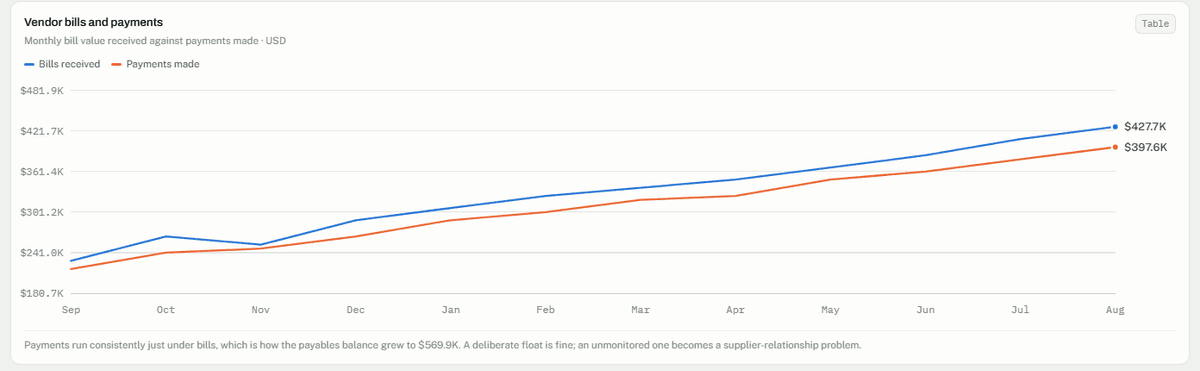
This connection helps finance teams understand the relationship between a purchase, the vendor’s bill and the payment made against it. F
or example, if a user has recorded a vendor bill but the vendor has received only part of the amount, the bill’s payment status shows the remaining balance.
The purpose is not simply to display financial information. It is to keep the underlying records connected so teams can trace transactions and investigate discrepancies.
Read the CrmLeaf procurement documentation for the documented purchasing, billing and payment workflows.
5. Review Procurement Information Through the Command Centre
Operational records are useful, but managers also need a way to review activity without opening every transaction individually.
Users can review information for their reporting period and permitted organizational scope, then drill into underlying records where available.
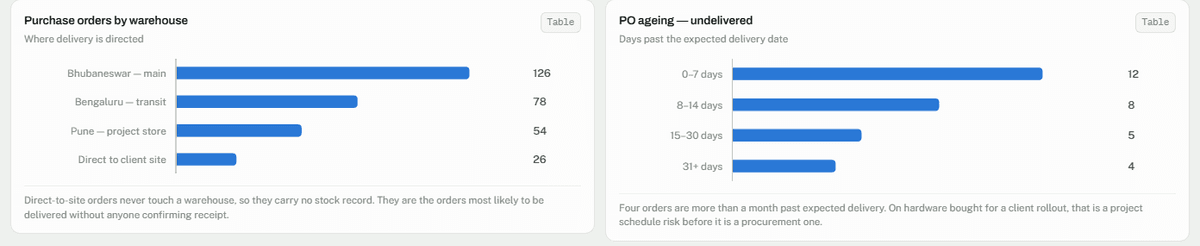
For Procurement & Inventory, the reporting subject covers purchasing, bills and stock.
This gives the dashboard a distinct purpose: helping users understand the state of procurement activity rather than replacing the operational screens used to create orders, record deliveries or process bills.
Dashboard availability and the exact metrics shown depend on account configuration, user permissions and enabled modules.
How the Procurement Workflow Connects Purchasing, Stock and Finance
Consider a hypothetical company that needs to purchase equipment for an upcoming project. The purchasing manager raises a purchase order for the required products and assigns a delivery warehouse. The team then issues the order to the vendor.
When the vendor dispatches the goods, the team updates the delivery status as the consignment progresses. Once the goods arrive and the team records the delivery, the order becomes eligible for billing if it remains unbilled.
The finance team can then create the vendor bill from the delivered purchase order, review the imported line items and record the invoice.
Finally, the team allocates the payment to the bill. If the payment exceeds the bill balance, CrmLeaf’s documented workflow creates a vendor credit for the excess.
Vendor → Purchase Order → Delivery → Bill → Vendor Payment → Vendor Credit, where applicable.
Each stage uses the record created by the preceding stage. This creates a traceable relationship across purchasing and finance.
For the warehouse team, the priority is recording what arrived. Purchasing teams focus on monitoring the order. Finance teams make sure the bill and payment reflect the correct records.
A procurement dashboard complements this workflow by helping authorized users review purchasing, billing and stock information in the Command Centre. Dashboard visibility does not automatically complete these transactions.
Users must still create and maintain the relevant records through the appropriate CrmLeaf modules.
Practical Benefits of Better Procurement Visibility
- Better purchase order oversight: Teams can review purchase and delivery statuses to identify orders that need follow-up.
- More informed inventory decisions: Multi-warehouse stock information can help teams assess availability before placing additional orders.
- Improved coordination: Purchasing, warehouse and finance teams can work from linked transaction records rather than relying entirely on separate status updates.
- Clearer billing processes: Linking bills to delivered purchase orders helps maintain consistency between what the business ordered, received and invoiced.
- Easier payment tracking: Bill statuses and payment allocations help finance teams understand outstanding balances.
- More traceable transactions: Linked records make it easier to follow a purchase through its lifecycle and investigate discrepancies.
These benefits are potential operational outcomes, not guaranteed savings or performance improvements.
Their realization depends on correct configuration, accurate data entry and the way each organization manages its procurement process.
How to Get Started with CrmLeaf Procurement & Inventory
- Confirm that the Purchase and Inventory capabilities the business requires are active on the account.
- Configure vendor records, products and warehouses as appropriate.
- Record purchase orders with the required line items and delivery information.
- Update delivery status when goods arrive.
- Create bills from eligible delivered purchase orders and record vendor payments.
- Confirm that the relevant Command Centre dashboard gives the intended users access.
CrmLeaf’s Purchase add-on availability depends on the product edition and account configuration.
Review theInventory & Procurement feature page and confirm plan availability with the CrmLeaf team before purchasing.
Conclusion
Procurement involves more than placing orders. Businesses need to coordinate vendors, deliveries, stock, bills and payments while maintaining accurate records across each stage.
CrmLeaf connects these activities through its Inventory & Procurement workflows and provides a Command Centre dashboard for reviewing procurement, billing and inventory information.
For businesses looking to improve purchasing oversight and make operational records easier to trace, the next step is to evaluate how CrmLeaf fits their existing procurement process.