
TL;DR:
- A support dashboard helps teams track incoming tickets, pending requests, and resolved issues.
- SLA reporting helps managers understand whether tickets receive responses and resolutions on time.
- Ticket reports can reveal which clients, channels, and issue types generate the most support work.
- Agent workload reporting helps managers identify uneven assignments and delays.
- Linking support tickets to clients and projects can help teams understand ongoing support needs.
- Knowledge-base analytics require reliable tracking, so proposed metrics should not be mistaken for live product features.
Introduction
When a client reports an issue, your team needs to know who will handle it, how quickly to respond, and whether anyone has resolved the problem. As the number of clients and projects grows, managing these requests becomes more difficult. A support dashboard brings those answers into one place.
Without clear reporting, support managers may struggle to identify growing backlogs, missed service targets, or team members carrying too much work. They may also find it difficult to understand why certain clients continue to need support after the team delivers a project.
A support dashboard helps teams organize ticket information and understand how support operations are performing. It can help managers review ticket volume, response and resolution times, service-level agreement (SLA) performance, and workload distribution.
The CrmLeaf Support Dashboard design organizes its reporting into three sections: Volume & SLA, Agents & workload, and Deflection & knowledge. These sections represent different ways to understand support operations and identify areas that may need attention.
This guide explains what each section covers, how the information can support day-to-day decisions, and what professional services teams should consider when reviewing support performance.
What Is the CrmLeaf Support Dashboard?
A support dashboard brings important support information into one reporting interface. Instead of reviewing individual tickets one by one, managers can use organized reports to identify patterns and decide what needs further investigation.
The CrmLeaf Support Dashboard source contains three sections:
- Volume & SLA: Understand ticket demand, pending work, response times, and resolution performance.
- Agents & workload: Review ticket distribution, agent activity, group performance, and workload-related patterns.
- Deflection & knowledge: Explore concepts related to knowledge-base usage and repeated support questions.
The supplied dashboard HTML labels its figures as illustrative mockup data. These figures demonstrate the proposed dashboard design; they are not verified customer results or confirmed live production data.
The Deflection & knowledge section also has a specific limitation: the source states that the necessary knowledge-base search and article-view tracking is not currently available. Teams must not present its analytics as live CrmLeaf functionality without confirmation.
1. Support Dashboard Volume & SLA: Understand Your Ticket Workload
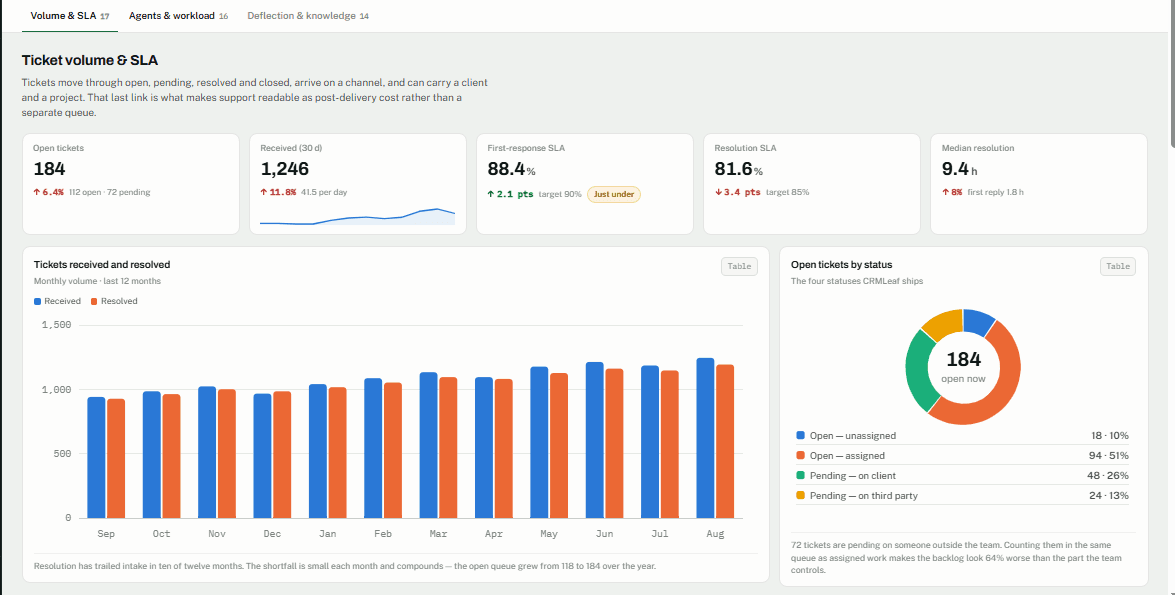
The Volume & SLA section focuses on how many support requests arrive, how many are resolved, and how long customers wait for assistance.
Track incoming and pending tickets
Imagine your team receives 50 support tickets in a day but resolves only 35. If this pattern continues, pending tickets may begin to pile up.
Tracking incoming and resolved tickets helps managers spot this problem early. They can investigate whether the team has too much work, some issues are taking longer to solve, or additional support coverage is needed.
The CrmLeaf dashboard design includes reporting concepts for tickets received, tickets resolved, open tickets by status, and ticket trends over time.
These reports help managers understand whether the workload is increasing or decreasing rather than relying on a single ticket count.
Understand ticket status
Tickets can move through different stages, such as open, pending, resolved, and closed.
Reviewing tickets by status helps managers understand where work is waiting. For example, a large number of pending tickets may prompt a review of requests awaiting client information, internal action, or further investigation.
Review the relevant tickets to confirm the reason for a delay, rather than assuming every pending request has the same cause. To see how statuses work in the product, read the guide to creating and managing tickets.
Find out where support requests come from
The dashboard design includes ticket reporting by channel, type, client, and group.
These views help managers answer practical questions:
- Which types of issues appear most often?
- Which channels generate the most support requests?
- Which clients need the most support?
- Which teams handle the largest share of the workload?
For example, if many tickets concern the same process, the team can investigate whether clearer instructions or better client communication would help.
Higher ticket volume does not automatically mean that a client or project is performing poorly. Also consider the service agreement, the complexity of the work, and client requirements.
Identify busy periods
The design also includes ticket-volume reporting by day and hour.
This can help teams investigate when support requests tend to arrive. If demand regularly increases during particular periods, managers can review staffing schedules and coverage arrangements.
These reports can guide planning, but managers should base decisions on observed patterns and the team’s actual operating requirements.
2. Monitor SLA Performance and Resolution Times in Your Support Dashboard
A service-level agreement, or SLA, defines the service expectations agreed upon between a provider and a client. Depending on the agreement, it may include targets for responding to or resolving support requests.
Monitoring these targets helps managers understand whether support is meeting expectations.
First-response time versus resolution time
These two metrics measure different parts of the support process.
- First-response time: How long a client waits for the first response to a ticket.
- Resolution time: How long it takes to resolve the reported issue.
For example, a support agent may respond to a client within 30 minutes but need several hours to investigate and resolve the problem. The first response was quick, but the full resolution took longer.
Looking at both metrics gives managers a clearer picture of support performance.
Check whether tickets meet SLA targets
The CrmLeaf dashboard source includes reporting concepts for first-response SLA, resolution SLA, SLA attainment, and SLA breaches.
SLA attainment shows how often tickets meet the relevant service targets. SLA breaches identify instances where the team missed a target.
If a team begins missing more targets, managers can investigate possible reasons, such as:
- A sudden increase in incoming tickets.
- Limited staff coverage during busy periods.
- Complex issues requiring additional investigation.
- Delays while waiting for information.
- Uneven distribution of work across agents or groups.
The numbers help identify where to look. They do not automatically explain why the delays happened. Teams that want to configure service targets can follow this tutorial on how to set up SLA rules.
Learn from reopened tickets
Sometimes a client or agent reopens a ticket after marking it resolved. This may happen because the issue returned, the solution was incomplete, or the client needed additional clarification.
Reviewing reopened tickets helps managers understand whether the team needs to improve its troubleshooting, documentation, or communication.
The aim is not simply to reduce the number of reopened tickets. It is to understand why they happen and address the underlying problem where possible.
3. Support Dashboard Agents & Workload: Balance Your Team’s Work
A support team can struggle even when its overall ticket volume appears manageable. If the team shares work unevenly, some agents may become overloaded while others have more available capacity.
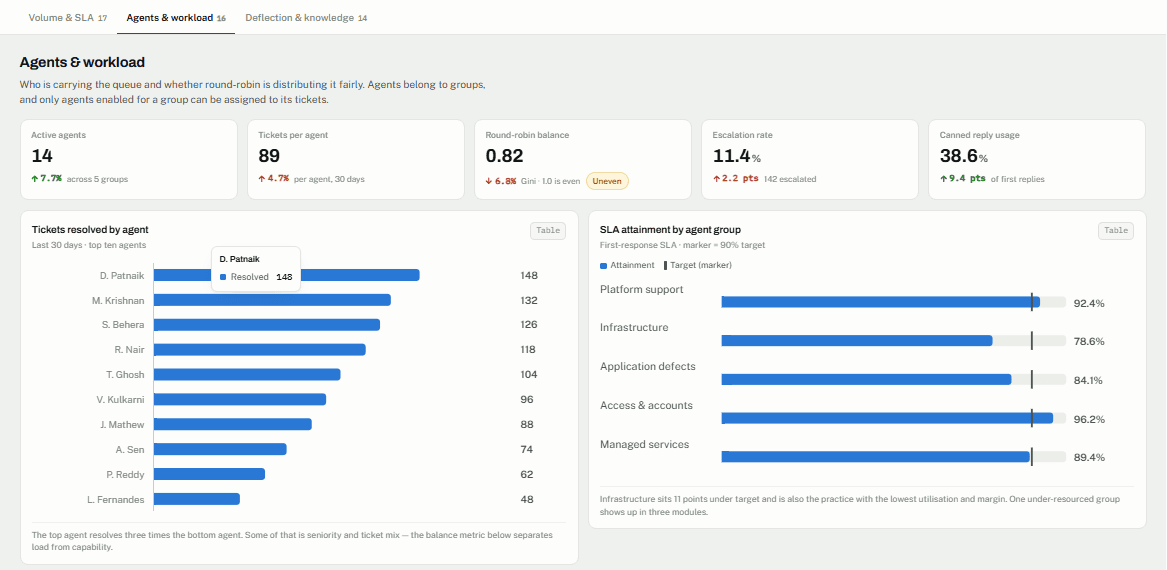
The Agents & workload section of the CrmLeaf dashboard design includes reporting concepts related to agent activity, ticket distribution, group performance, escalations, and reopened tickets.
Check ticket distribution across agents
Reviewing ticket counts by agent can help managers see how the team shares work.
For example, if one agent consistently handles far more tickets than others, the manager can investigate whether assignments, specialist responsibilities, or staffing coverage explain the difference.
However, ticket counts alone do not measure workload fairly. A person handling fewer complex cases may be carrying more work than someone handling many straightforward requests.
Managers should consider ticket complexity, resolution quality, and responsibilities before changing assignments.
Compare support groups
The dashboard design includes concepts such as tickets resolved by agent, SLA performance by group, and workload by group.
These views can help managers identify teams that may need additional attention.
If one group takes longer to resolve tickets, the reason might be more complex cases, limited specialist knowledge, higher demand, or insufficient coverage. Reviewing the underlying work helps managers choose an appropriate response.
Investigate escalations and response patterns
An escalation occurs when a ticket needs additional attention, specialist support, or a higher level of review.
Tracking escalations and reopened tickets can help teams understand which types of issues require additional work. The source also lists reporting concepts such as round-robin balance, canned reply usage, internal note ratio, agent availability, and response time by hour.
Where the live product and the underlying data support these measures, they can help managers investigate assignment patterns, standardized responses, and coverage gaps.
The design also lists unassigned tickets and unassigned ticket ageing as reporting concepts. These can help teams identify requests that may need an owner or timely follow-up.
The goal is to use reporting to improve how the team manages work—not to judge employees using one metric alone.
4. Support Dashboard Deflection & Knowledge: Reduce Repeated Questions Through Better Documentation
Clients often ask similar questions about processes, services, and previously delivered work. When support teams must provide the same explanation repeatedly, they may spend time answering questions that clear documentation could potentially address.
A well-maintained knowledge base can help teams provide consistent answers. However, its effectiveness depends on whether the content is accurate, useful, and easy to find.
What does the CrmLeaf design include?
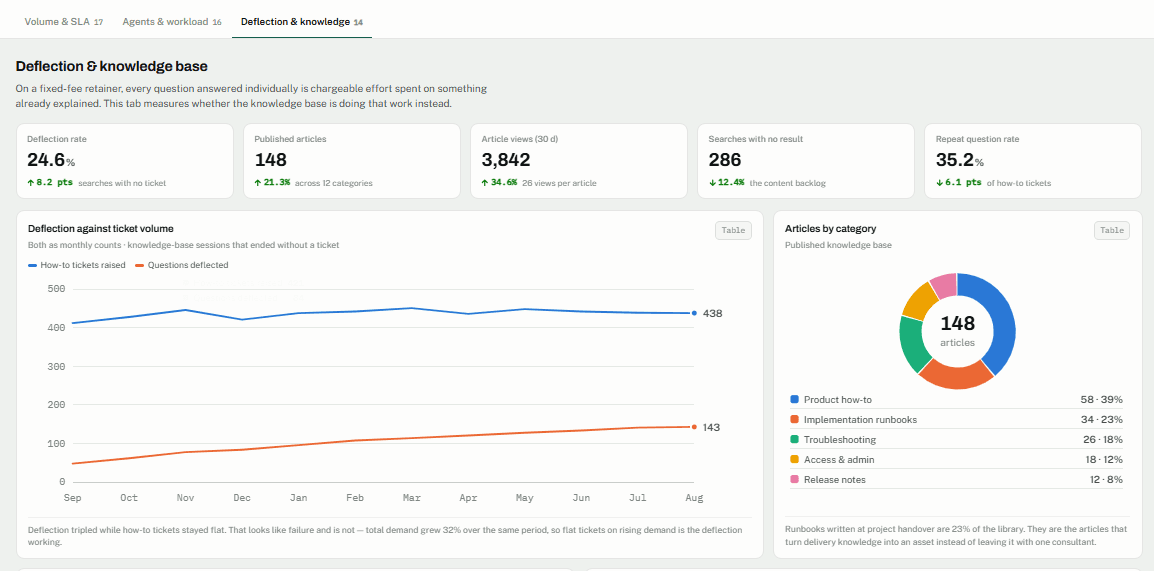
The supplied Support Dashboard design contains a Deflection & knowledge section with concepts such as:
- Published knowledge-base articles.
- Article views.
- Searches that return no results.
- Repeat question rate.
- Search-to-ticket rate.
- Article freshness.
- Runbook coverage.
- Canned replies linked to articles.
The design also includes proposed charts for articles by category, most-viewed articles, searches without matching articles, repeat questions by topic, and deflection compared with ticket volume.
Important: The supplied source states that the required knowledge-base search and article-view event tracking is not currently available. Therefore, treat these metrics and visualizations as design concepts—not as confirmed live CrmLeaf analytics.
How can teams improve knowledge management?
Teams can still review recurring tickets manually to identify opportunities to improve documentation.
For example, if clients repeatedly ask how to complete the same task, the support manager can review existing instructions and determine whether they need clearer steps, screenshots, or additional explanations.
A practical process is to:
- Identify questions that appear repeatedly in support tickets.
- Review existing documentation related to those questions.
- Update unclear or outdated instructions.
- Create new guidance where a genuine information gap exists.
- Review future support requests to assess whether the changes appear helpful.
This process can improve knowledge management without relying on analytics whose availability is unconfirmed.
Connect Support Dashboard Insights With Project Delivery
For professional services businesses, a project’s delivery date does not always mark the end of the client relationship. Clients may need follow-up guidance, technical assistance, maintenance, or clarification after the team completes the main work.
Connecting support tickets with clients and projects, where supported, can help managers understand this ongoing work.
Understand which clients need ongoing support
Ticket reports by client can help teams identify where support requests are concentrated.
Managers can use this information to prepare client reviews, discuss ongoing service needs, and investigate recurring questions.
A higher number of tickets does not automatically mean a client is unhappy or the team delivered a project poorly. Consider the requests alongside the agreed service scope and the client’s requirements.
Identify recurring project-related issues
Suppose several support tickets relate to the same project handover process. The delivery manager could review those tickets to see whether the handover instructions were clear and whether clients received enough guidance.
This is a hypothetical example of how support information may inform a review—not a claim about an actual CrmLeaf customer result.
Where ticket-to-project associations are available, they can help teams investigate repeated issues and consider whether changes to documentation, training, or delivery procedures are needed.
Use support information during client reviews
Support reporting can help teams prepare more informed discussions with clients. Managers can review recurring requests, understand the type of assistance the team provides, and decide whether additional communication or process improvements are appropriate.
Ticket association provides useful context, but it does not automatically prove the cause of an issue or calculate project profitability. Those conclusions require additional information and careful review.
Turn Support Dashboard Reports Into Practical Actions
A dashboard becomes useful when the team acts on what it learns. The following examples show how support managers can turn reporting signals into next steps.
| What you notice | What it may mean | What to do next |
|---|---|---|
| Pending tickets are increasing | Incoming work may exceed the team’s current resolution capacity | Review priorities, ticket complexity, and staffing coverage |
| More tickets are missing SLA targets | Some requests may be delayed | Identify the affected tickets and investigate the reasons |
| Resolution times are increasing | Certain issues may require more investigation | Review dependencies, escalation paths, and available expertise |
| One agent handles many more tickets | Work may be unevenly distributed | Compare case complexity and review assignments |
| Tickets are frequently reopened | Some issues may not be fully resolved | Review resolution notes and recurring problems |
| A client submits similar requests repeatedly | The client may need clearer instructions or additional support | Review the tickets and improve documentation or communication |
| Tickets remain unassigned | Some requests may lack clear ownership | Review assignment and follow-up responsibilities |
These examples are starting points for investigation, not automatic diagnoses. Teams should examine the underlying tickets before deciding on a solution.
A simple review process is to identify a pattern, investigate the relevant cases, agree on an action, and revisit the results. This keeps support reporting focused on practical improvements rather than numbers alone. Teams that want to refine their workflow can also review these ticket management best practices.
Who Can Benefit From Support Dashboard Reporting?
Business owners
Business owners can use support reporting to understand ongoing service demand and identify operational issues that require attention. Client and project context can inform planning and service reviews. Owners weighing the investment can review this service desk consolidation business case.
Support managers
Support managers can review ticket volume, pending work, SLA performance, and workload distribution. This helps them identify where the team may need additional attention or process improvements.
Project and delivery managers
Project managers can investigate recurring support requests related to delivered work, where tickets link to projects. This information can inform handover reviews, client communication, and future delivery practices.
IT services and operations teams
IT services teams can review recurring technical issues, escalation patterns, and resolution delays. Operations leaders can use the findings to investigate support processes, staffing coverage, and team responsibilities. Operations leads can also read how CrmLeaf supports professional services operations managers.
The most useful reporting is accurate, relevant to the team’s service commitments, and reviewed consistently.
Conclusion: Make Better-Informed Decisions With a Support Dashboard
Managing support effectively means understanding more than how many tickets arrive. Teams also need to know how quickly the team addresses issues, how it distributes work, and what recurring requests reveal about client needs.
The CrmLeaf Support Dashboard design brings these reporting concepts together through Volume & SLA, Agents & workload, and Deflection & knowledge. Used with reliable data and the appropriate product capabilities, structured support reporting can help professional services teams investigate issues and make better-informed decisions about ongoing client service.
Explore CrmLeaf’s professional services capabilities to see whether they fit your team’s workflows.