
TL;DR: CrmLeaf Admin Dashboard 2.0
- One business-wide view: review indicators across sales, projects, resources, timesheets and finance in a single place.
- Headline KPIs: monitor billed revenue, cash collected, open pipeline, active projects, utilization and headcount.
- Health & Alerts: spot exceptions such as project risks, overdue invoices and unsubmitted timesheets.
- Cross-module visibility: follow work from leads to won deals, projects, invoices and collections.
- Financial and performance reporting: compare targets with actuals, revenue with delivery cost, and bookings with billings and backlog.
- Focused investigation: filter by reporting period, location and department, then open the module dashboards for detail.
Growing businesses need visibility across sales, delivery, people, time and finance. However, when each team works from its own report, leaders spend more time comparing numbers than deciding what to do next.
The CrmLeaf Admin Dashboard answers that problem with one consolidated view.
It brings headline KPIs, operational alerts and cross-module indicators together, so administrators can see how the business is performing and where to look first. Dedicated module dashboards then provide the detail behind each figure.
This release update walks through what the dashboard shows, how its parts connect, and how to build a simple review routine around it.
What is the CrmLeaf Admin Dashboard?
The CrmLeaf Admin Dashboard is a centralized reporting view for administrators and business leaders. Instead of reading several departmental reports side by side, you review selected KPIs, find exceptions and decide where to dig deeper.
It is organized around two views:
- Company Pulse: a consolidated summary of selected operational and financial indicators.
- Health & Alerts: exceptions and potential issues that may need attention.
Together, they answer two questions. How is the business doing overall? And which area should we investigate next?
This matters most in professional services, where sales commitments, project delivery, staff capacity, recorded time and finance depend on each other.
Why do businesses need an admin dashboard?
Fragmented reporting hides the full picture
Sales, finance, delivery and resource teams each produce useful reports. Even so, someone still has to connect the numbers by hand. A consolidated view reduces that effort by placing selected indicators side by side.
Operational issues arrive together
A business may have overdue invoices, a project over its estimated hours and several missing timesheets in the same week. Reviewing each separately makes prioritizing harder. Grouping exceptions in one place helps administrators decide which team to contact first.
One function affects another
Winning a deal does not mean a project has started. Likewise, sending an invoice does not mean the cash has arrived. Cross-module visibility helps you see where work stalls between stages.
Management reviews need context
Leaders need definitions, targets and the reasons behind a change, not isolated numbers. A dashboard supports that conversation, although detailed analysis still belongs in the source records.
Key features of the CrmLeaf Admin Dashboard
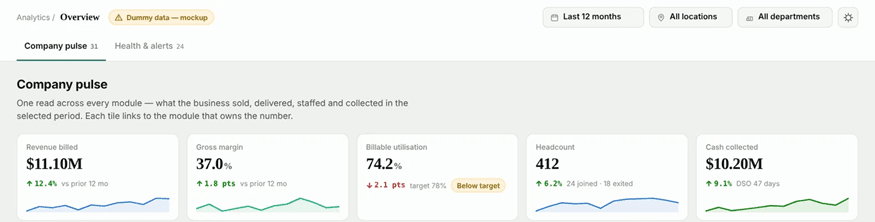
Company Pulse: monitor business performance
Company Pulse covers areas such as:
- Billed revenue and cash collected
- Bookings and open sales pipeline
- Active projects and projects at risk
- Billable utilization and timesheet compliance
- Headcount and support performance
Suppose billable utilization drops below target. An operations manager can then review resource allocation, upcoming project demand and available capacity. If cash collected lags, finance can check overdue invoices and payment status.
Health & Alerts: focus on exceptions
This view highlights issues such as:
- Projects exceeding budgeted hours
- Overdue invoices
- Timesheets not yet submitted
- Resources that are overallocated or on the bench
- Recruitment requests open for a long time
- Stalled performance reviews
- Support and service exceptions
Reviews can then center on problems instead of treating every KPI equally. A project alert might prompt the delivery team to compare estimated hours with logged time. An overdue-invoice alert might prompt finance to examine invoice ageing.
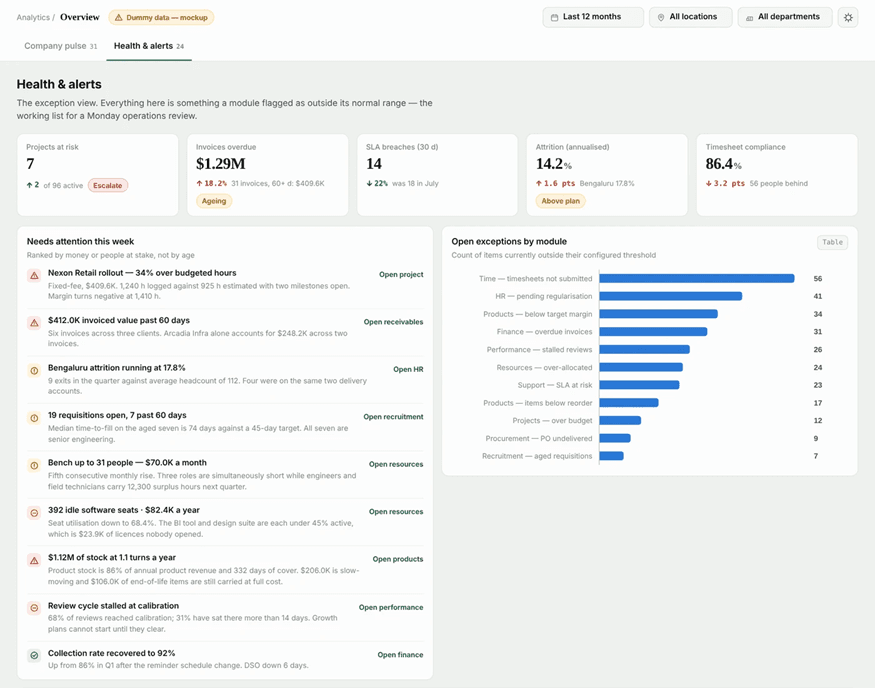
An alert signals that something may need attention. The responsible team still has to find the cause and choose the fix.
Revenue and delivery cost
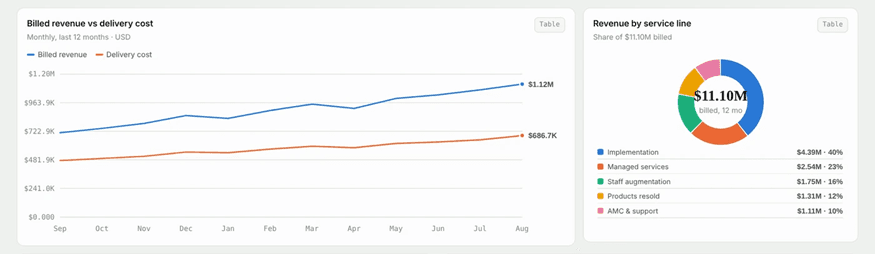
Revenue alone is incomplete for a services business. The dashboard includes a billed-revenue-versus-delivery-cost view for the selected period. Delivery cost can include timesheet hours valued at hourly cost, plus billable expenses, depending on your cost data and reporting rules.
Comparing the two helps managers ask whether delivery cost is rising faster than revenue, and which projects or services deserve a closer look.
Revenue by service line
This view groups billed revenue by offering, for example implementation, managed services, staff augmentation, resold products, and maintenance and support. It shows whether revenue is concentrated in one line and whether a shift in service mix is affecting financial performance.
Sales-to-project-to-cash visibility
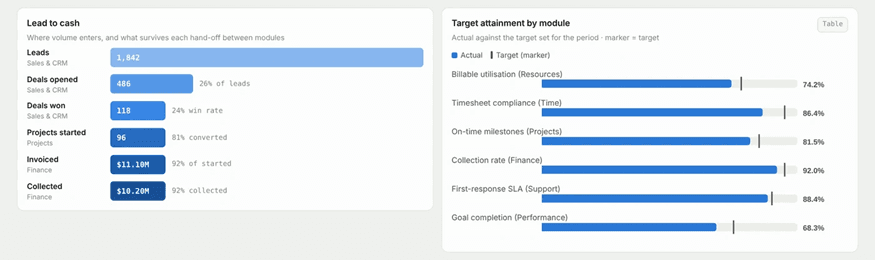
Performance depends on more than lead generation. The dashboard follows this sequence:
Leads → Won deals → Projects started → Invoicing → Collections
- Leads: incoming sales opportunities.
- Won deals: opportunities converted into business.
- Projects started: the handover from sales to delivery.
- Invoicing: the value of work billed.
- Collections: payments received against amounts outstanding.
If won deals do not turn into projects, sales and delivery leaders may need to review handover and project setup. If invoices stay unpaid, finance can examine follow-up.
Target attainment
Target attainment compares actual results with defined targets for measures such as:
- Billable utilization
- Timesheet compliance
- On-time milestones
- Collection rate
- First-response service-level agreement (SLA)
- Goal completion
Low timesheet compliance, for instance, may point to problems in submission or approval. These comparisons only help when targets are valid and the underlying records are accurate.
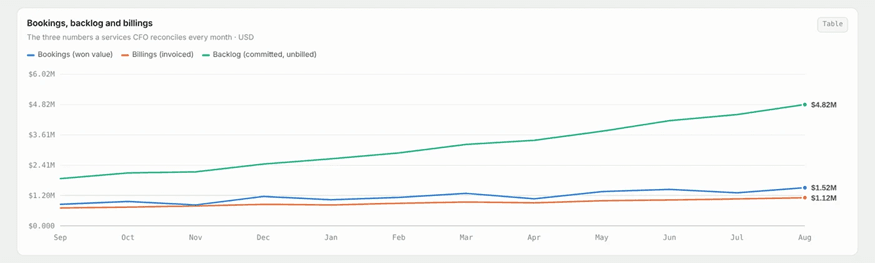
Bookings, billings and backlog
These three measures answer different questions. A standard definition of bookings and billings treats bookings as the contract value committed and billings as the amount invoiced in a period. In the dashboard, backlog is a calculated view of committed work not yet invoiced.
| Metric | What it tells you |
|---|---|
| Bookings | Value of won work or commitments, per the reporting definition |
| Billings | Value invoiced during the selected period |
| Backlog | Committed work not yet invoiced, per the defined calculation |
A gap between bookings and billings can prompt a review of project start dates, milestones and invoicing schedules. Because backlog is calculated, its meaning depends on the aggregation rules and on complete commitment and invoice records.
KPI ledger and metric definitions
A consolidated view is only as useful as its definitions. The KPI ledger lists indicators, their values and the module that owns the source data. Utilization, for example, relies on recorded time and available capacity, while collection metrics rely on invoice and payment records. Before acting on an important KPI, check its definition, period, source data and calculation method.
Filters for focused analysis
Three filters narrow the view:
- Reporting period: the time window you want to review.
- Location: results for a specific business location.
- Department: a particular function or team.
A company-wide staffing indicator can look stable while one location faces a capacity or attrition problem. Filters help you find that.
How does the Admin Dashboard connect business functions?
Professional services businesses rely on links between sales, delivery, people, time and finance. The dashboard reflects indicators from areas such as:
- Sales and CRM: leads, opportunities and won deals
- Projects and delivery: progress and delivery indicators
- Resources: capacity, allocation and utilization
- Time and timesheets: recorded time and compliance
- Finance: revenue, invoices and collections
- HR: staffing indicators
- Support: service requests and performance
- Procurement and products: purchasing and stock information
A sales indicator can lead to a project check, and a delivery issue can prompt a review of timesheets, capacity or invoicing. The Admin Dashboard gives the broad view, while each module dashboard remains the place for detail. To see the wider platform context, read about CrmLeaf’s professional services automation capabilities.
Example: turning a project alert into action
Consider a team in its weekly operations review.
- Spot the issue. An administrator sees that a project may be exceeding its estimated hours.
- Review the details. The delivery manager compares estimated hours, recorded timesheets and open milestones.
- Find the cause. The team checks for scope changes, resource allocation problems or delivery delays.
- Coordinate follow-up. The responsible teams agree on next steps.
- Check again. In the next period, the administrator reviews the project indicators and records.
The dashboard supports this process. It does not decide the cause or guarantee a fix.
How to use the CrmLeaf Admin Dashboard
A steady routine turns numbers into management conversations.
Daily review
- Scan headline indicators and high-priority exceptions.
- Flag issues that need quick investigation.
- Contact the responsible teams.
Weekly management review
- Examine project risks, capacity, timesheet compliance and overdue receivables.
- Review exceptions across departments and locations.
- Confirm owners and next steps for open issues.
Monthly performance review
- Review revenue, collections, pipeline and delivery for the period.
- Compare actual results with targets.
- Identify recurring exceptions.
- Check KPI definitions and source data before drawing conclusions.
Admin Dashboard vs. individual dashboards
| Dashboard | Primary purpose |
|---|---|
| Admin Dashboard | Consolidated business view and operational exceptions |
| Finance Dashboard | Financial reporting and finance indicators |
| Sales Dashboard | Pipeline, opportunities and conversion |
| Resources Dashboard | Capacity, allocation and utilization |
| Time & Timesheets Dashboard | Recorded time and timesheet performance |
| Projects & Delivery Dashboard | Project progress and delivery indicators |
The difference is breadth versus depth. The Admin Dashboard shows the wider position and where to investigate, whereas the individual dashboards support focused analysis. It complements them and does not replace them.
Benefits and limitations
Potential benefits include:
- Consolidated visibility across several business areas
- Faster triage, because you see which function needs attention first
- Clearer KPI interpretation through definitions and source ownership
- Better prioritization around gaps and exceptions
- Cross-functional context for sales, delivery, resources and finance
On the other hand, any dashboard depends on accurate source records, consistent definitions, correct access permissions and valid calculations. Verify the context of important figures before using them in a decision. Sample figures in product screenshots or mockups are illustrative and are not customer results.
Conclusion
The CrmLeaf Admin Dashboard brings key indicators and operational exceptions into one view.
By connecting sales, projects, resources, time and finance, it gives business reviews broader context and shows where to investigate further.
If you want to see how this fits your own reporting needs, schedule a demo to walk through the dashboards with the CrmLeaf team, or start a free trial to explore them yourself.